Ditto gives you access to the best AI models from every major company. Pick your favorite model when you want control, or turn on Auto and let Ditto choose one for each message.
Available Models in Ditto
Main Agent Models
These models handle your primary conversations with Ditto. The available list can change over time and is pulled dynamically from the service catalog.
Current Providers
Ditto currently supports models from these providers in the app:
- OpenAI (GPT family)
- Anthropic (Claude family)
- Google (Gemini family)
- xAI (Grok family)
You may also see additional providers in the model catalog depending on availability.
Note: The exact model list updates over time. For the full, current list, open Settings → Models in the app.
AI Image Creation
GPT-image-1 image model with advanced capabilities:
- GPT-image-1: High-quality image generation with strong text rendering
- Personalized Prompts: Ditto learns your art style and crafts prompts
- Style Memory: Remembers your preferences across sessions
How to Switch Models
Through Settings
- Click on the Settings icon in the Ditto interface
- Open the Models tab
- Browse models grouped by provider/family
- Select a model to make it your main agent
Auto: Let Ditto Pick the Model
Auto is a switch at the top of the model picker in chat. Turn it on and you no longer choose a model. Ditto reads each message, judges how demanding it is, and answers with the fastest model that can handle it. Auto is off until you turn it on.
The three levels
Auto has one setting: how readily it moves a message to a stronger, slower, more expensive model.
| Level | Simple messages | Everyday work | Hard questions |
|---|---|---|---|
| Quick (the default) | Fast model | Fast model | A mid-priced model |
| Balanced | Fast model | A mid-priced model | A strong model |
| Thorough | Fast model | A strong model | The strongest model |
- Quick gives the fastest replies at the lowest cost. It steps up only for hard questions.
- Balanced uses a stronger model for everyday work. It costs more.
- Thorough uses the strongest model for hard questions. It is the slowest and costs the most.
What you see
- Which model answered. Each reply’s cost line says “Auto picked” and the model’s name. Open the cost line for why Auto chose it, what it cost and how long it took.
- A notice for the strongest model. When Auto gives a message to the strongest model, a notice says so as the wait begins, because that reply is slower and costs more. Press Don’t show again to turn the notice off on that device.
- How Auto works. The same details are in the app, under the Auto switch.
Good to know
- Cost. You pay for the model that answered each message, at that model’s usual rate. Auto itself is free.
- Staying on a model. Once a conversation moves to a stronger model it stays there for a few minutes, so replies do not switch models mid-thought. A message that is clearly simple, such as “thanks”, goes back to the fast model.
- Your plan and region. Auto only uses models your plan and region allow. If the model it would choose is not available to you, it uses the next one down.
- Turning it off. Pick any model from the list, or switch Auto off to return to the default model.
Auto in workflows
A workflow step that reasons with a model can use Auto as well. Open the workflow’s graph editor, select the step, and turn on Auto under Model. Ditto judges the step’s goal each time the workflow runs, and the run’s timeline shows which model it chose.
Choosing the Right Model
Main Agent Models
- Flagship Models: Best for complex reasoning, nuanced understanding, and creative tasks
- Balanced Models: Good trade-off between performance and speed for everyday questions
- Fast Models: Quick responses for simpler queries
- Specialized Models: For domain-specific expertise or particular reasoning styles
What You’ll See in the Model Picker
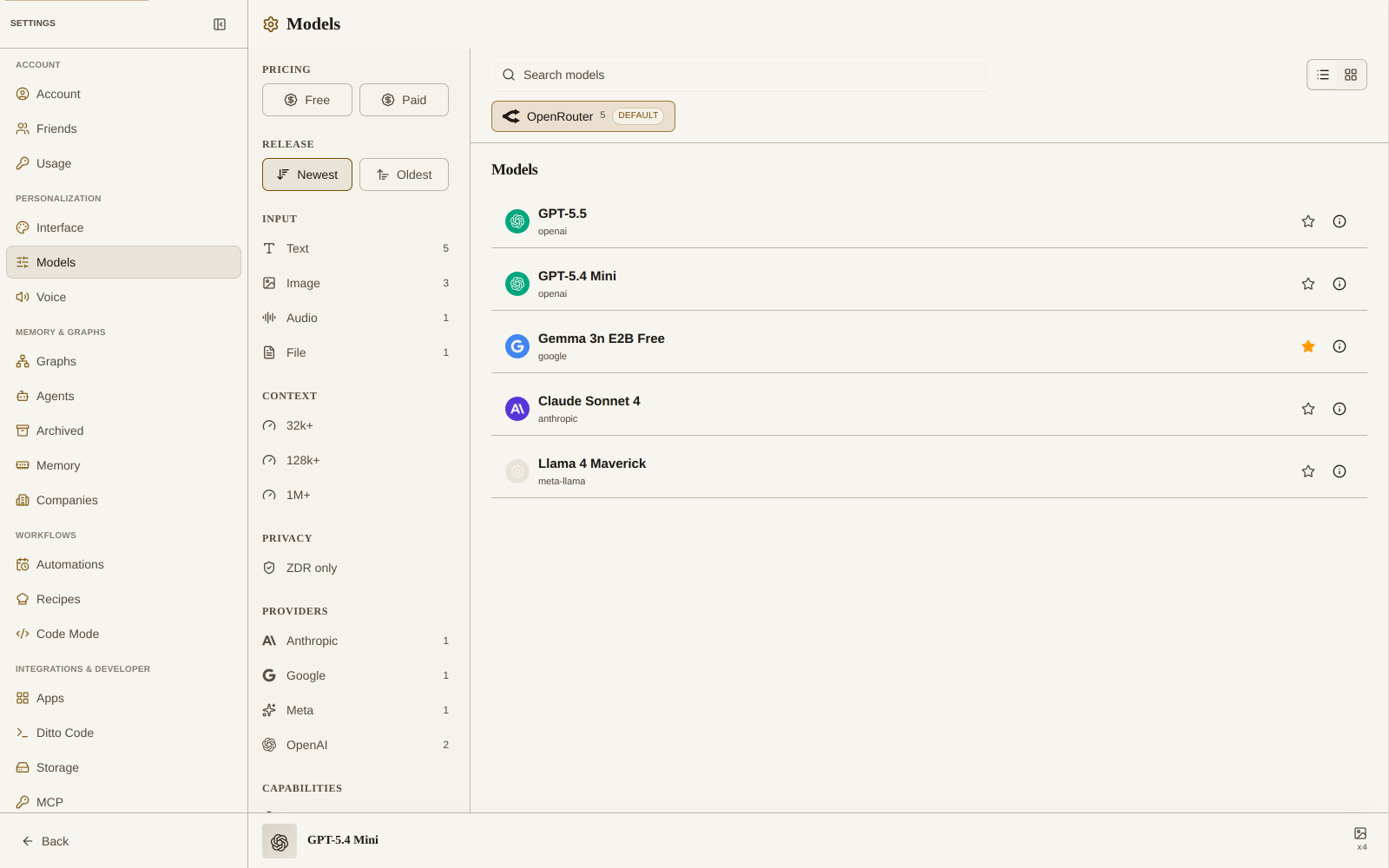
- Provider filters (OpenAI, Anthropic, Google, xAI)
- Sorting by speed, intelligence, or cost
- Model details for each entry (capabilities, strengths, and limitations)
- Tier indicators showing when a model requires Spark / Strong / Hero
AI Image Creation
- GPT-image-1: High-quality image generation with strong text rendering
- Smart Prompting: Ditto enhances your prompts based on your artistic style
- Style Learning: Continuously improves based on your preferences
Model Performance Characteristics
Speed vs. Capability
- Smaller models respond faster but may have less reasoning depth
- Larger models provide more thoughtful responses but take longer to generate
- Consider your task’s complexity and time sensitivity when choosing
Specialization vs. Generalization
- Some models excel at specific domains (coding, creativity, analytical reasoning)
- Others provide better all-around performance across diverse tasks
- Match the model to your specific needs for optimal results
Token Economy Considerations
- More capable models generally consume more tokens per response
- Different subscription tiers provide different allocations of model access
- Balance performance needs with token efficiency
Subscription Tier Model Access
Model availability varies by subscription tier. See in-app settings for current model access and limits.
Coming Soon Features
Enhanced Model Features
- Real-Time Voice Chat: Talk to any AI model like you’re on a phone call
- Multi-Model Conversations: Seamlessly blend different models in one chat
- Performance Learning: Ditto learns which models you prefer for different tasks
Current Capabilities
Manual Model Selection
You can pick your favorite model from all the top AI companies, or turn on Auto and let Ditto pick for each message.
Context Preservation
Ditto preserves conversation context when switching models, creating seamless transitions between different AI systems.
Personalized Experience
Ditto remembers your model preferences and conversation history, making every interaction more relevant and useful.
By strategically selecting the right models for different tasks, you can maximize both efficiency and effectiveness in your interactions with Ditto.