Most workflows run from start to finish by themselves. Some jobs need something only you know: how your week went, which of three options you prefer, whether a draft is good enough to keep. For those, a workflow can stop and ask you, wait for your answer, and then carry on with it.
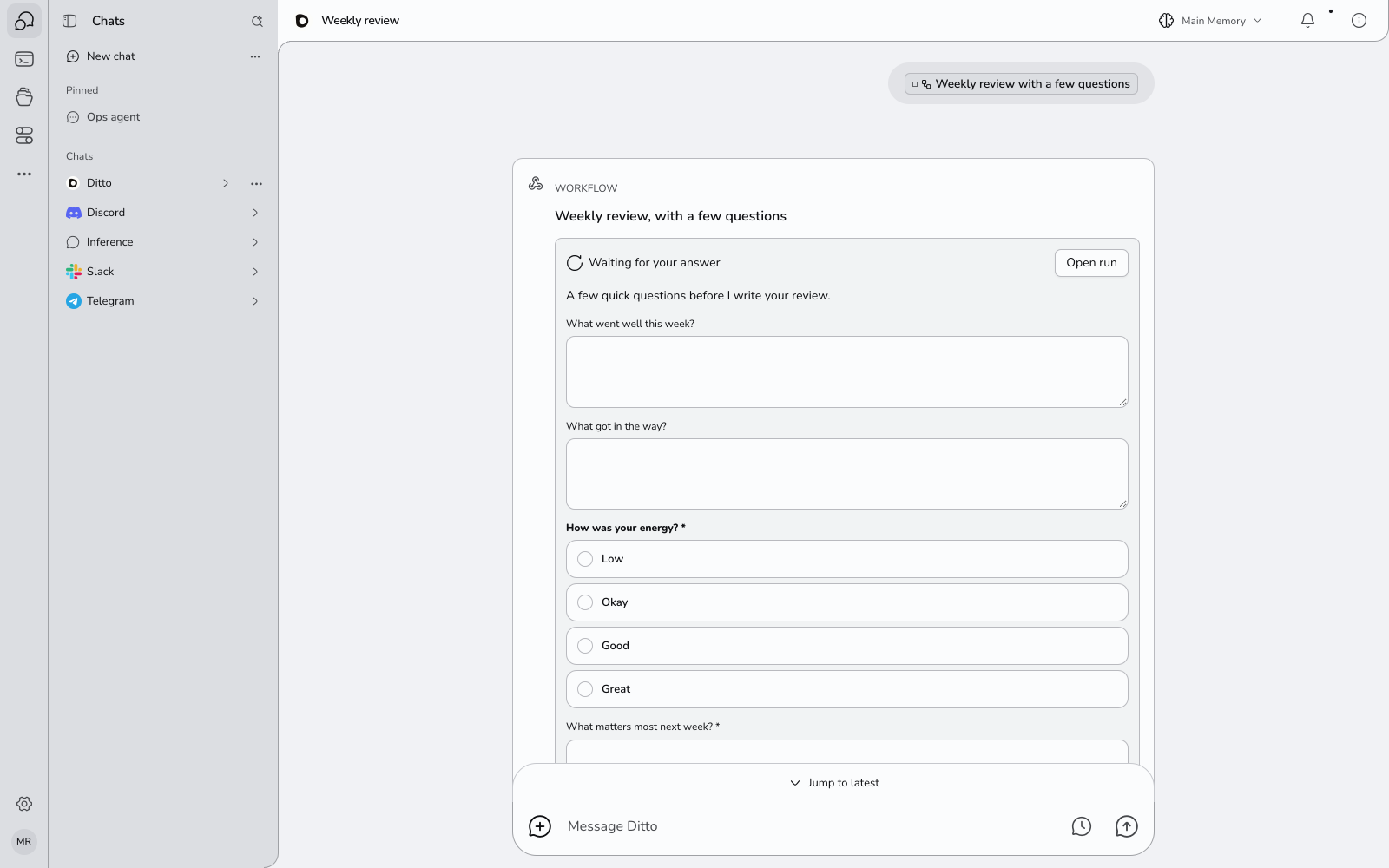
What a Question Looks Like
A question is a short form. Each part of it is one of these:
| Kind | You answer by |
|---|---|
| Text | Typing a line |
| Long text | Typing a few lines |
| One of a list | Picking one choice |
| Several of a list | Picking any number of choices |
| Date | Picking a day |
| Number | Typing a number |
| Yes or no | Picking yes or no |
A list can also take another answer that is not one of the choices, when the workflow allows it. Parts marked with a star must be answered before you can send.
A workflow can ask at the start, after it has gathered what it needs, or at the end, before it delivers. At the end it can show you what it made and ask whether to go ahead: the ready-made Plan my day, then check with me drafts a plan, shows it to you, and only keeps it if you say yes.
Try One
Three ready-made workflows ask questions. On the New workflow screen, search for them or look under Everyday:
- Weekly review, with a few questions asks how your week went, then writes your review from your answers and your notes.
- Help me decide asks what you are deciding and what matters to you, then lays out the trade-offs.
- Plan my day, then check with me drafts a plan and waits for your yes.
In the outline, a question is a step like any other: “Ask how your week went, and wait for your answer”.
Make Your Own
Say what the workflow should ask when you describe it or ask for it in chat. For example:
Before you write my weekly update, ask me what I shipped and what
is blocked. Then write the update and save it to my files.
Find three recipes for dinner tonight, ask me which one I want,
then make a shopping list for it.Say what the choices are if there are any (“ask me whether I want it short, medium or long”), and Ditto makes it a list instead of a text box.
Ditto only adds a question when you ask for one. A workflow you describe without mentioning a question runs straight through.
Where You Answer
You can answer wherever you see the question. Answering in one place answers it everywhere.
- In the chat, when you started the workflow from a chat. The form is on the run’s card.
- On the run’s page. Open the workflow, then the run. The form is at the top, under Waiting for your answer.
- In your notifications. Open the bell and answer in the notification itself.
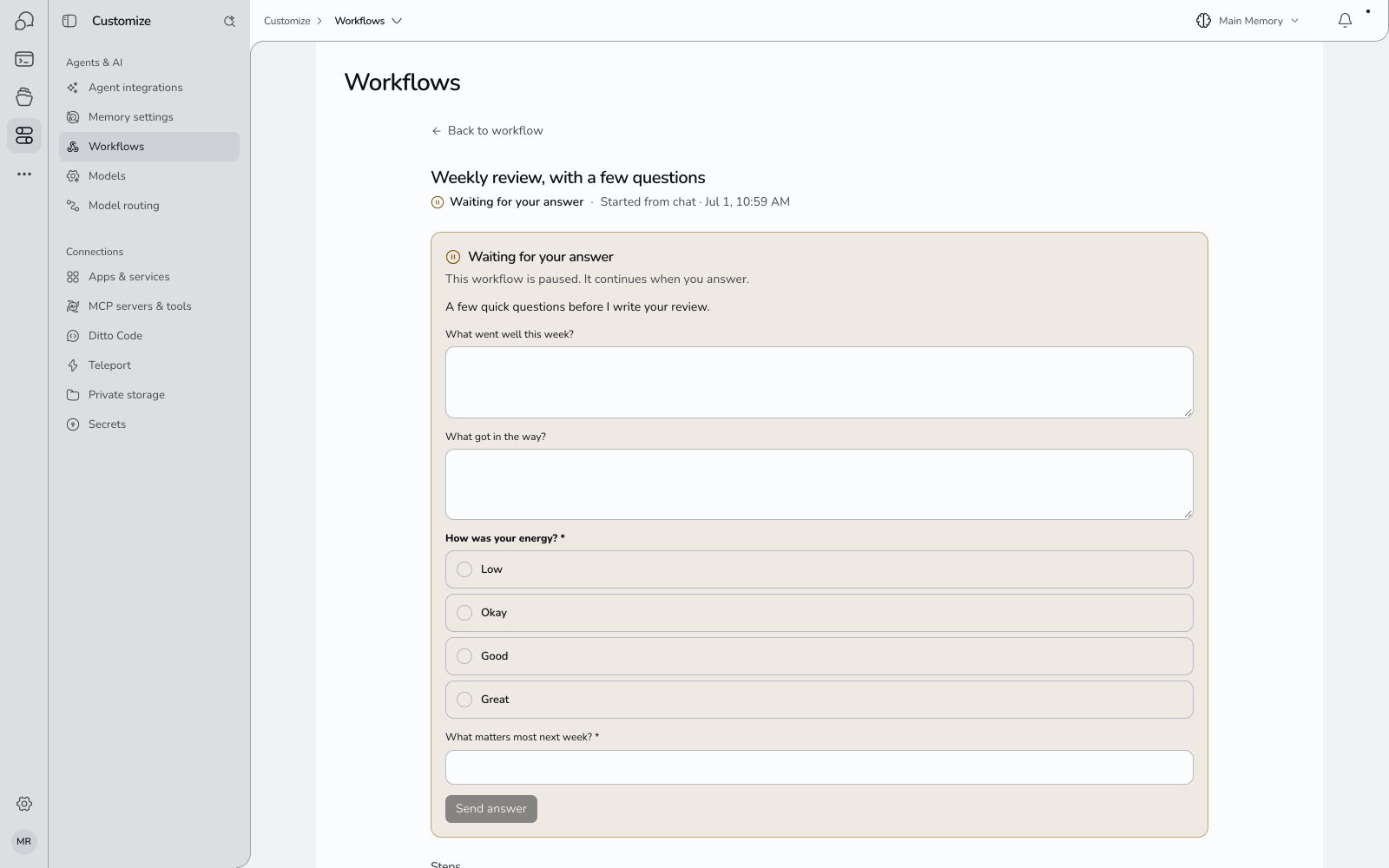
Press Send answer and the run continues from where it stopped. The steps after the question can use what you said.
On the run’s page, the step that asked is marked Needs your answer until you do.
If You Do Not Answer
A workflow that runs on a schedule cannot wait forever. Here is what happens to a question nobody answers:
| When | What happens |
|---|---|
| Straight away | You get a notification, Workflow has a question for you, with the form |
| After a day | One reminder: Still waiting for your answer |
| After two days | The workflow stops waiting |
What “stops waiting” means depends on the workflow:
- If you have answered this question on an earlier run, the workflow goes on with what you answered last time, and tells you: Workflow went ahead without your answer.
- If you never have, the run stops and tells you: Workflow stopped: no answer. Run it again when you are ready.
A workflow you started from a chat does not send the first notification, because the question is already in front of you in the conversation. The reminder a day later still comes.
If you have notifications turned on for the Ditto app on your phone, these reach you there too.
Things That Change Each Time
A question is asked partway through a run. A workflow can also need something before it starts: a topic, a name, a date. Ditto calls these things that change each time, and they use the same kinds of answer as a question: text, long text, one or several of a list, a date, a number, yes or no.
- When you press Run now, Ditto asks for them with the same form fields.
- Each can have a usual value, which is filled in for you and which scheduled runs use.
See Creating a Workflow.
Changing the Questions
Open the workflow and press Edit. The question step shows what it asks.
- Ask for the change in words, in the box under the outline or in chat: “also ask me how many people are coming”.
- If Ditto says it cannot keep the question through that change, open More options and edit the steps there.
Limits
| Questions in one form | 12 |
| Choices in one list | 40 |
| Reminder | One, after a day |
| How long a question waits | 2 days |
Questions
Does trying a workflow ask me? No. A try fills in the usual answers and keeps going, so you can see the whole thing work.
Can a scheduled workflow ask me a question? Yes. It asks through a notification and waits up to two days, as described above. If the question matters every time, prefer a workflow you start yourself.
Does a waiting run cost anything? No. Nothing runs while it waits.
Can someone else answer for me? No. Only you can answer your workflows’ questions.