A skill is a set of written instructions for an AI agent: what the job is, how to do it, what to ask, what to produce. Claude and other agents keep them in a file called SKILL.md.
If you already have a skill, you do not have to describe the job to Ditto again. Paste the skill, and Ditto turns it into a workflow that does the same job.
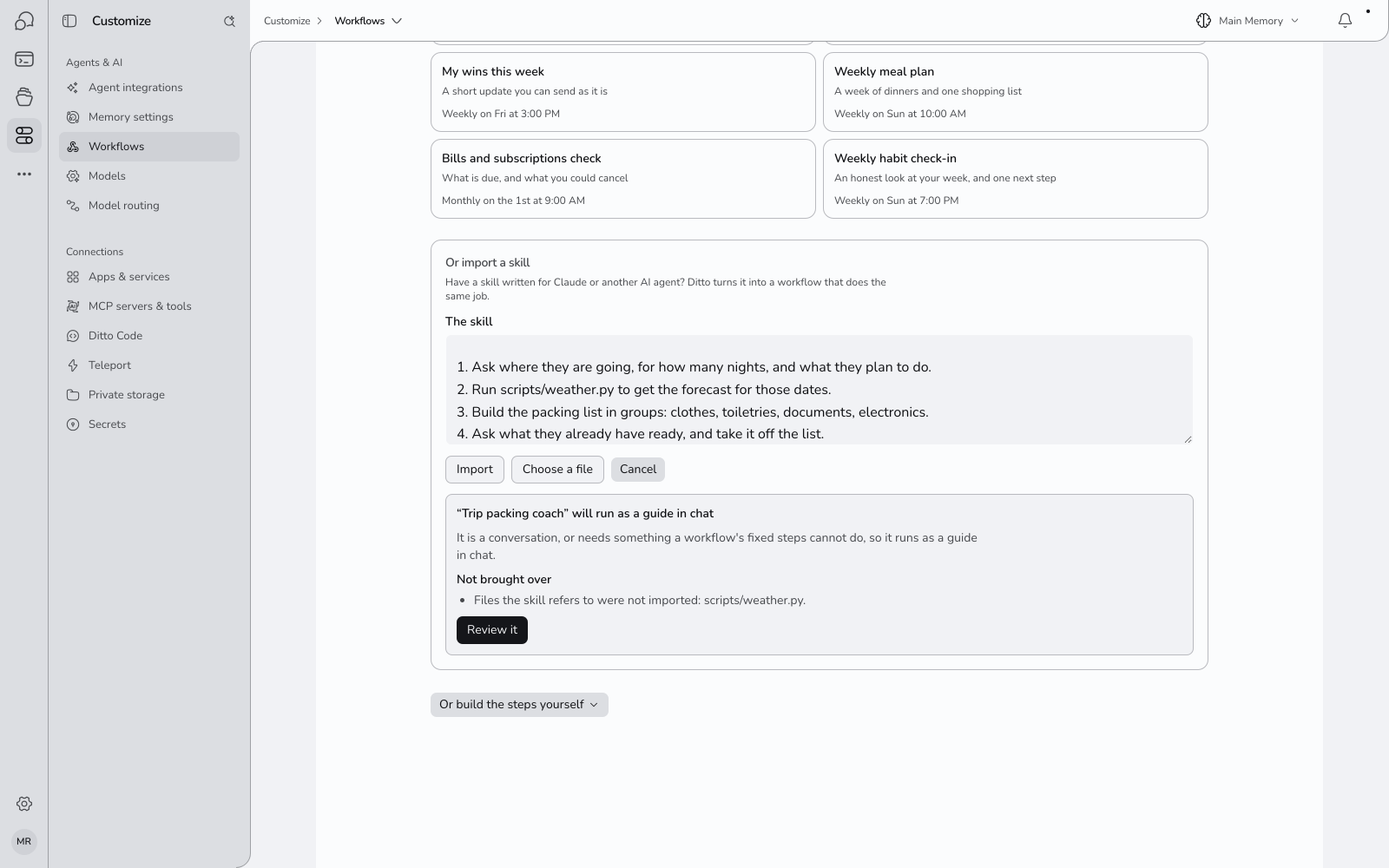
Import One
- Open Customize → Agents & AI → Workflows and press New workflow.
- Under the ready-made workflows, press Import a skill.
- Paste the contents of the skill’s
SKILL.md, or press Choose a file and pick it. - Press Import. This usually takes ten to thirty seconds.
- Read what Ditto made of it, then press Review it.
- The draft opens in the editor. Change what you like and press Create workflow.
Nothing is saved until you press Create workflow.
What You Get Back
Ditto reads the skill and decides which of two things it is.
A Workflow with Steps
A skill that describes a job with a clear shape, such as “gather this, write that, send it there”, becomes an ordinary workflow: steps that run by themselves, on a schedule if you want one.
Ditto then tells you what changed by making it a workflow, in numbers:
- How many of its steps are fixed: they do the same thing every run without AI deciding what to do.
- How many times a run uses AI, instead of an agent working through the whole skill each time.
- How many questions it asks you, if the skill asks for things.
- Whether it can run on a schedule.
Fixed steps are why a workflow is cheaper, faster and more predictable than handing the same skill to an agent each time: the parts that never change are not thought about again.
A Guide
A skill that is a conversation, or that needs judgement at every turn, becomes a guide: Ditto follows the skill’s instructions with you in a chat. Ditto says so: “It is a conversation, or needs something a workflow’s fixed steps cannot do, so it runs as a guide in chat.”
A guide keeps the skill’s instructions as they were written. Start it with Start in a chat on its page, or with @ in any chat.
What Is Not Brought Over
An import takes the text of the skill. Under Not brought over, Ditto lists what the skill relied on that did not come with it:
- Other files. If the skill refers to files beside it, such as
scripts/weather.pyorreference/style.md, they are named and not imported. - Code. If the skill includes code for the agent to run, the workflow does not run it. It works from what the skill describes.
Read this list before you save. If a missing file held the important part, paste its contents into the step’s instructions in the editor.
A skill that needs an app, such as Gmail or GitHub, works once that app is connected.
Check It Before You Rely on It
An import is a draft, like any other.
- For a workflow with steps, press Try it in the editor to run it once without sending anything. See trying a workflow.
- For a guide, save it and press Start in a chat.
Then compare what it does with what the skill did where it came from.
Limits
| Size of the skill | 64 KB of text |
| What is read | One SKILL.md. Not a folder or a link |
| A guide’s instructions | About 12,000 characters |
Questions
Which skills work?
Any that are written instructions: Claude skills, and similar files written for other agents. The top of the file may have a name and a description between --- lines; Ditto uses them if they are there, and works without them.
Is the skill followed word for word? As a guide, yes: Ditto is given the instructions as written. As a workflow with steps, Ditto rebuilds the job from what the skill describes, so read the outline.
Does the skill tell Ditto what to do during the import? No. Ditto reads the skill as a description of a job. Instructions inside it are not carried out while importing.
Can I import the same skill twice? Yes. Each import makes a new draft.