
Bookmarks let you save important messages for quick reference later. Whether it’s a useful code snippet, a research summary, or a creative idea, bookmarking keeps it one tap away.
How to Bookmark a Message
- Find the message you want to save.
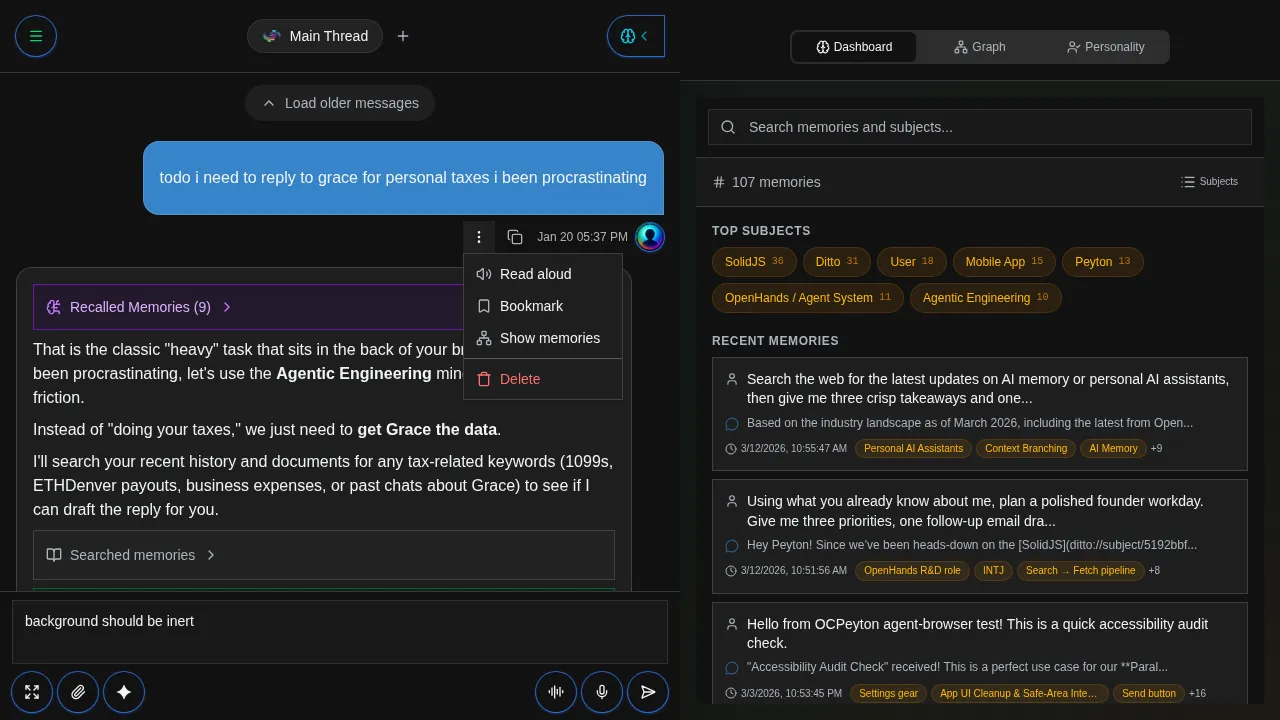
- Tap the More actions button (three dots) on the message.
- Select Bookmark from the menu.
Viewing Your Bookmarks
Access your saved bookmarks from the sidebar. Bookmarked messages are organized by when they were saved and include the original conversation context.
When to Use Bookmarks
- Important answers: save responses you’ll need to reference again
- Code snippets: keep useful code examples within reach
- Research notes: bookmark summaries and key findings
- Action items: save messages that contain tasks or next steps
- Creative ideas: preserve brainstorming results and inspiration
Bookmarks vs Memory
Bookmarks and memory serve different purposes:
| Feature | Bookmarks | Memory |
|---|---|---|
| What it saves | Specific messages you choose | Conversation context automatically |
| How it works | Manual, you pick what to save | Automatic, Ditto learns over time |
| Access | Browse your saved list | Ditto recalls relevant context |
| Best for | Quick reference to specific content | Building long-term understanding |
Use bookmarks for things you want to find again quickly. Use memory for things you want Ditto to know about you.