An assistant makes choices before it writes an answer. Which model should handle this request? And when a coding agent saves something useful, which project and chat should remember it?
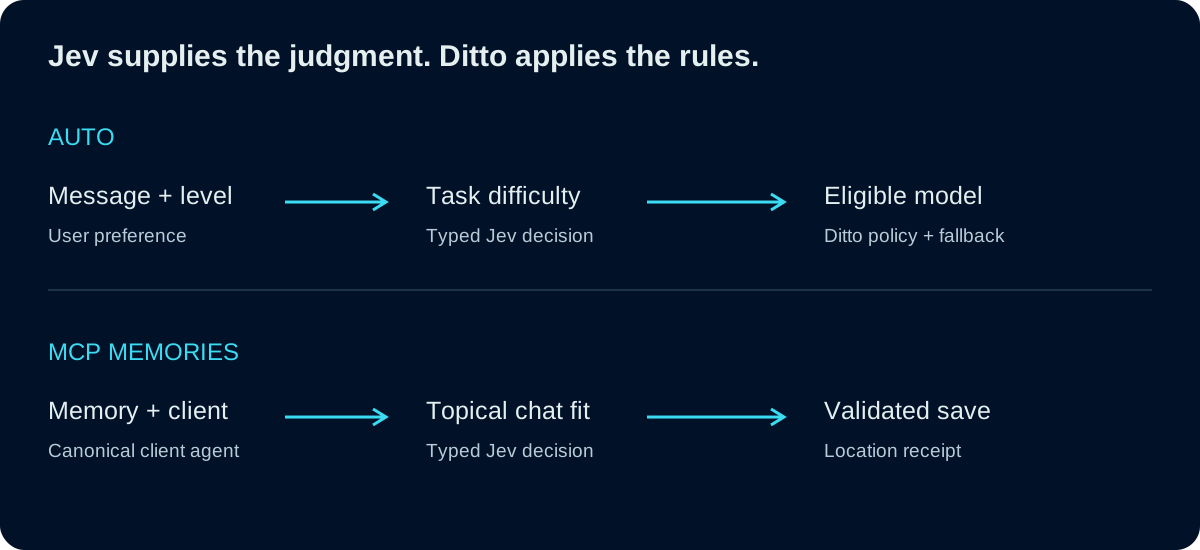
We use Jev, TypeSafe’s decision model, for both. Auto uses it to judge the work before choosing an answering model. Our new MCP layer uses it to judge where a memory belongs. The questions differ, but the design is shared: give Jev a bounded question, then let ordinary code validate the answer and perform the action.
Availability: Auto is available through Ditto’s model picker, subject to your account’s entitlements. Automatic MCP placement and cleanup are being introduced through a controlled rollout. Connecting an MCP client does not by itself enable either feature.
A decision before the answer
Jev accepts a state and typed questions. A choice question returns a selection from declared options, probabilities for those options, and a separate confidence value. Our integration uses the OpenRouter Decisions API. Jev supplies decision evidence; Ditto’s code owns permissions, thresholds and side effects. OpenRouter’s Jev guide describes that interface.
That distinction matters. A plausible answer from a model cannot grant access to a graph, invent a valid database ID, or authorize moving someone’s history. Those checks happen in code.
Auto: match the answering model to the work
When you choose Auto, you choose how readily Ditto should move up its model ladder:
- Quick favors the fast rung and allows a limited step up.
- Balanced can reach a stronger model for demanding work.
- Thorough can reach the strongest rung for hard requests.
For messages that need judgment, Jev evaluates whether the work is simple, standard or hard. Ditto maps that distribution and your selected level to an eligible model. Obvious short messages and some follow-ups can take a direct path without another Jev call.
The result is a normal model selection before the answer request is built. The chosen model writes the answer through Ditto’s usual provider, context, access and billing paths. Auto also considers conversation continuity: a short “yes, go ahead” should continue the work you just approved. The current level still caps the selection.
The decision has a time budget. If it cannot finish, Auto uses its fallback policy rather than waiting indefinitely. Plan and regional restrictions still apply. You can inspect the model and routing reason in the answer’s cost details, and choose a model manually where your account allows it.
The practical goal is straightforward: everyday requests should not require choosing a model each time, while harder work can receive more capable models within your chosen approach. We are not presenting these examples as a benchmark or a promise of lower costs on every request.
MCP: choose where the memory belongs
MCP lets an external assistant, such as Cursor, use Ditto’s memory tools. A useful saved memory should remain easy to find after the coding session ends. Requiring the assistant to pick a fixed destination at connection time can leave unrelated work together or split one project across several disconnected chats.
For eligible connections with automatic organization enabled, the Jev MCP layer makes two bounded decisions:
- Choose the agent. Compare the saved work with authorized project agents, using their names, configured purpose and available topic context. Reuse a suitable agent, or take the supported new-agent path when none fits.
- Choose the MCP chat within it. Continue a relevant external session or create a topical child chat. Related saves can continue together even after a pause.
For example, a fictional team maintains a project called Harbor Launch. A Cursor memory about that project’s webhook retry policy belongs under Harbor Launch, in an MCP chat about webhook reliability. A later memory about the same retry change can join that chat. An unrelated research note should be evaluated separately.
Clear agent descriptions help. “Harbor Launch owns onboarding, webhook reliability and release maintenance” is more useful placement context than an overlapping project name with no explanation.
Uncertainty has an explicit path
The layer validates Jev’s response against candidates supplied by the server. Model-facing labels map to authorized records; the model cannot supply arbitrary destination IDs. Automatic matching currently requires a sufficiently high selected-option probability. That probability and Jev’s confidence are recorded separately.
When the decision is uncertain or unavailable, the save can fall back to an MCP Inbox. This keeps the memory available for review instead of pretending a weak match is a good one. The saved-location receipt identifies the actual agent and chat, including the location of a deduplicated memory.
Existing fixed-destination credentials retain their behavior. Explicit sessions and restricted credentials keep their scope. If a client explicitly requests automatic routing when it is unavailable, the request fails before writing; it does not silently switch to a manual destination.
Existing history needs review
Good placement for new saves does not finish reorganizing an existing account. The cleanup feature examines a bounded portion of MCP history and proposes changes, including moving a session, consolidating related sessions, organizing selected memories, renaming, or removing an empty session.
You review counts and excerpts before approving. A scan produces suggestions; it does not silently rearrange history. Approval and Undo check that the affected content and settings still match the reviewed state. Undo remains available until changes to those sessions make the original reversal unsafe. Protected histories, active work and attached credentials impose additional limits.
This is also how we tested the feature: a real Cursor connection saved related memories into the intended agent and shared MCP child, then a bounded historical move was approved, checked in Ditto and undone. That proves those paths in the tested preview. It does not mean every historical memory has been reorganized.
The shared design
Auto asks, “What kind of work is this?” The MCP layer asks, “Where does this work belong?” Both use typed decisions inside a system whose rules remain explicit.
For Auto, those rules include the model ladder, account eligibility, continuity and fallback. For MCP memories, they include authorized candidates, destination validation, receipts and reviewable cleanup. That lets us use language understanding at the point where it helps, while keeping execution and access under the application’s control.
Try Auto from the Ditto app, or see the MCP connection guide for connecting your assistant. Automatic organization and cleanup controls appear when enabled for your account.