Your day does not happen in one app. A client pings you on Telegram. Your team argues in Slack. Your community lives on Discord. Each of those conversations carries decisions, promises, and context, and each one forgets the others exist.
You are the sync layer. You copy the decision from #launch-week into a DM. You re-explain the Telegram thread to the Slack channel. You scroll three apps to answer one question: wait, what did we actually decide?
Multi-chat in Ditto V2 removes that job. Telegram, Slack, and Discord now live inside Ditto as one inbox, and every conversation feeds the same memory.
Your code and your chats, one memory
Here is the implication we did not expect to matter most.
Connector messages land in your main Ditto memory graph, the same one Ditto exposes over MCP. So any coding agent you have already pointed at Ditto (Claude Code, Cursor, Codex, any other MCP client) can now search what your team said in Slack, Telegram, and Discord, alongside the code work Ditto already tracks for you.
Your agents read the repo. Now they read the room. Three ways that shows up:
- Mid-task, in Claude Code. You are refactoring the launch page and ask, “what did the team decide about the launch review time?” The agent searches Ditto memory and answers from the Aurora Launch Crew group, where Leo Park moved it to 3pm. You never left the terminal or opened Telegram.
- Before you touch the CTA, in Cursor. “Is there any reported bug on the dark-mode CTA?” Up comes Marcus Webb’s report in #launch-week, and the fact that it is tracked as #412. You fix the reported bug instead of the one you assumed.
- Writing release notes, in an agent job. Asked to draft them, the agent pulls what the #community beta testers actually complained about, rather than what the commit log says changed.
This is read-through-memory: semantic search over the chat history you chose to ingest. You control which services are connected, connections are read-only by default, and disconnecting a service stops the flow.
One inbox that respects where each chat came from
Open Ditto and your chats are just there, side by side in the sidebar. Twelve Telegram conversations, the #launch-week channel from your Slack workspace, your Discord server’s #community room. One sidebar, one search, one place.
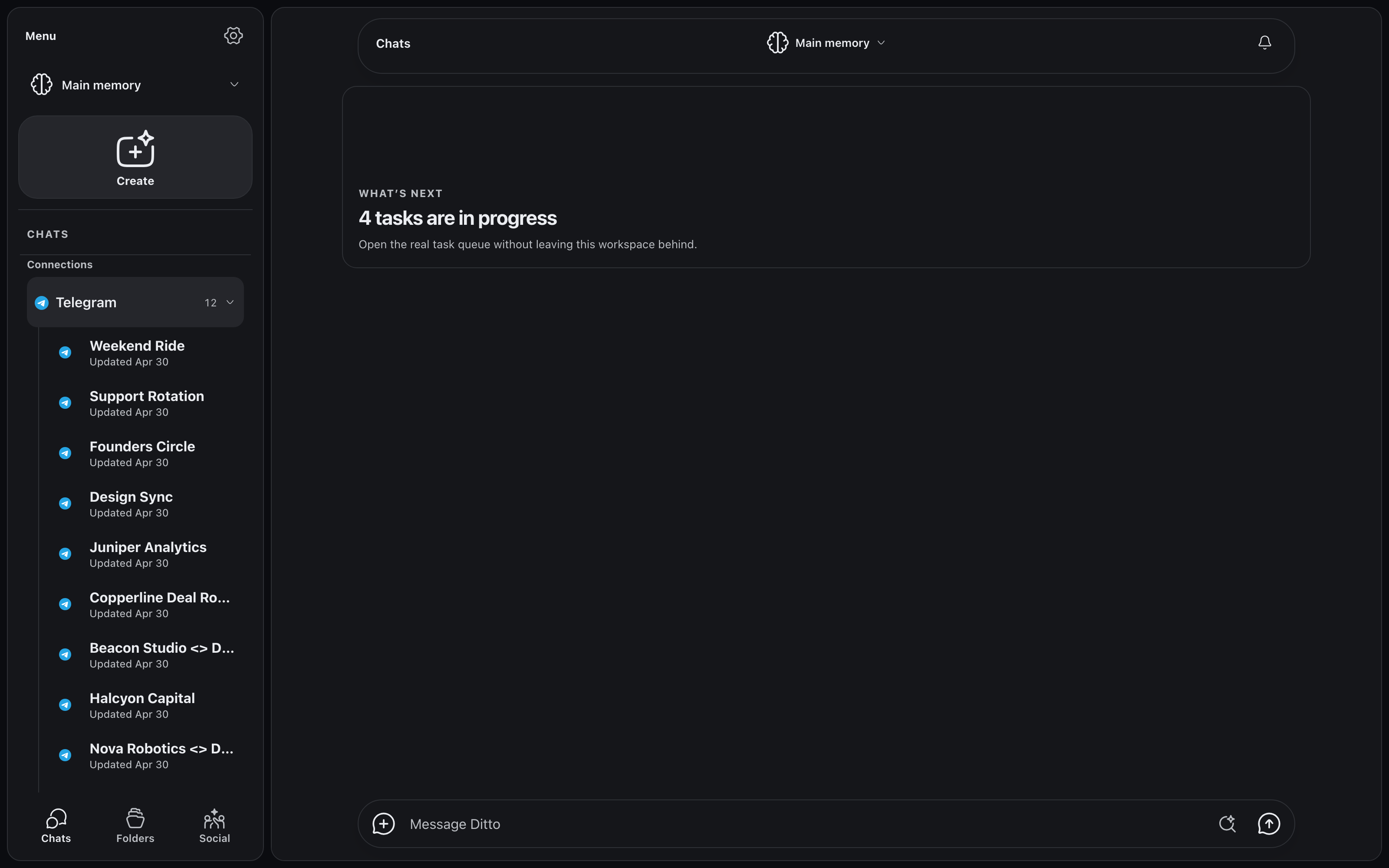
We were strict about one thing: each chat should look like itself. Telegram conversations render with Telegram’s bubbles, replies, and media. Slack threads look like Slack threads. Discord channels read like Discord channels. There is no “Ditto-flavored” flattening where every message becomes the same gray rectangle. If you have used the original app, you already know how to read the mirrored one.
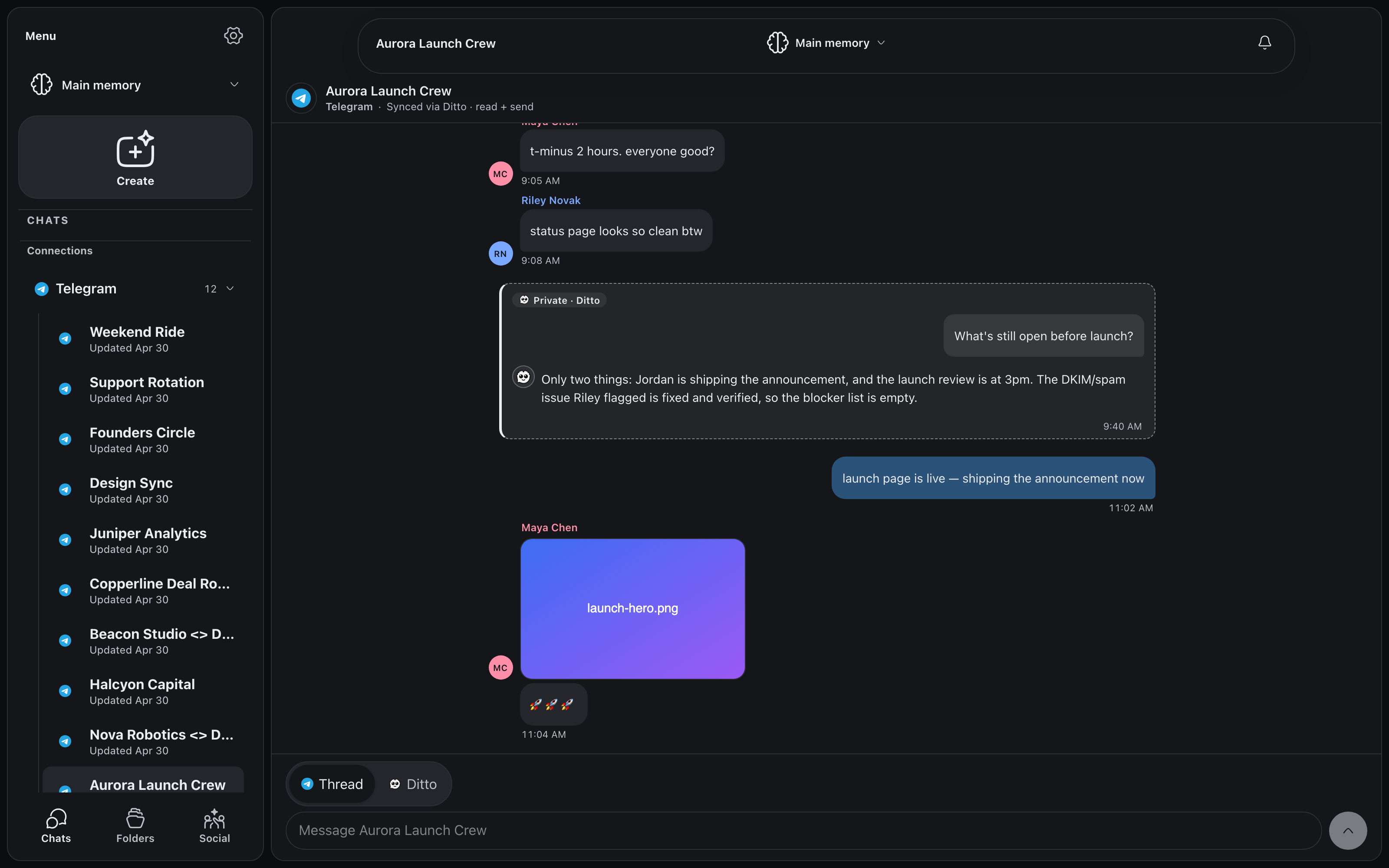
And it is live. When Maya Chen posts “t-minus 2 hours” in the Aurora Launch Crew group, it lands in Ditto at the same moment it lands in Telegram. Media comes along too: her launch-hero.png shows up as an image bubble, and a PDF in Slack shows up as a file chip. There is no refresh button because there is nothing to refresh, and no import step because nothing is ever stale.
Reply as you, from Ditto
Reading everything in one place is half the job. The other half is answering without app-switching.
Answer a Telegram message from Ditto and it arrives in Telegram as you. Same for Slack. On Discord, replies post through a bot webhook that carries your name and avatar, so the channel sees you, not a robot account.
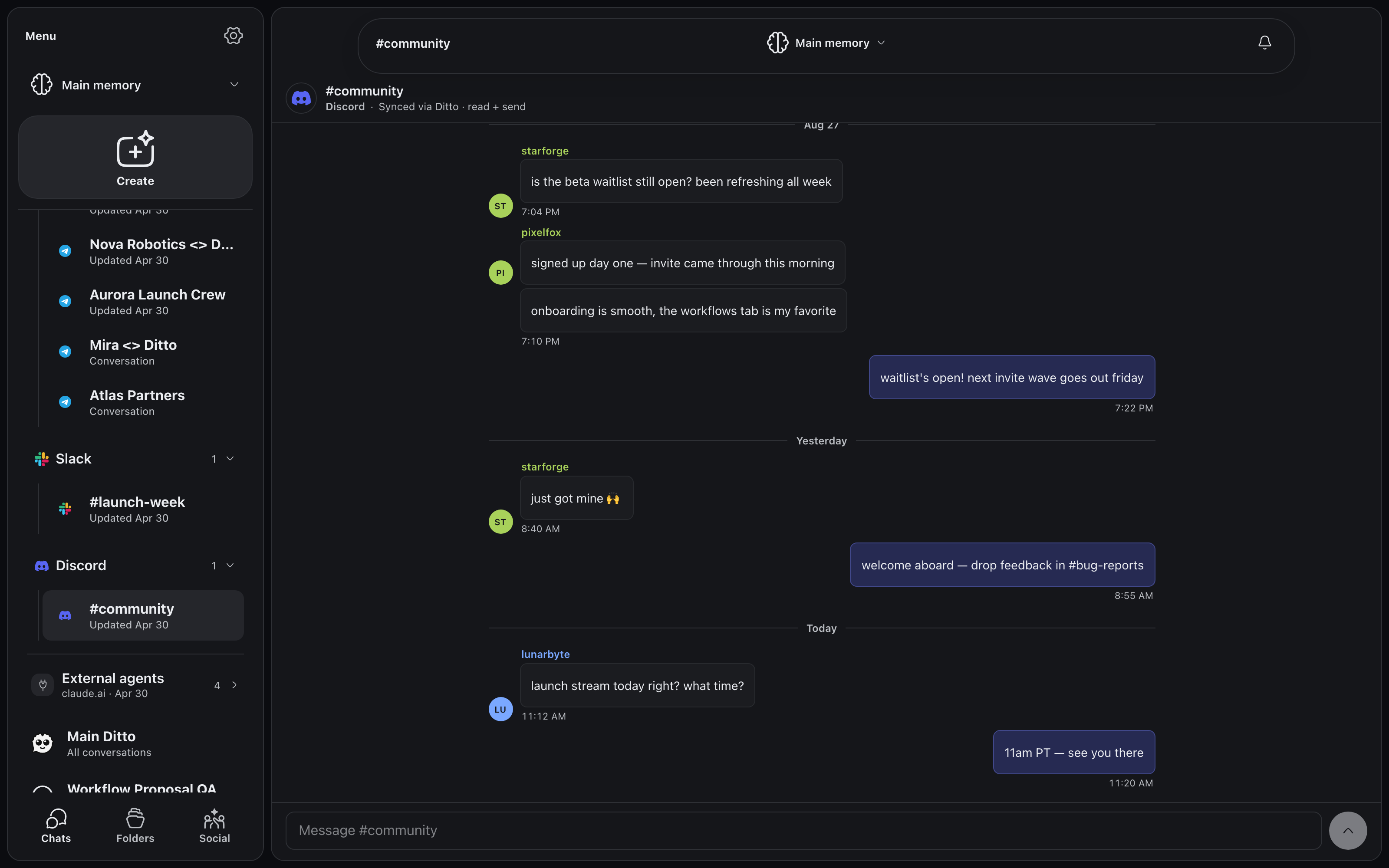
Sending is opt-in, per service. Every connection starts read-only, and it stays read-only until you decide otherwise. Turning on replies for Telegram does not turn them on for Slack. Ditto is explicit about the state of each connection: the chat header says “read-only” or “read + send”, so you always know what a send would do before you type it. You can disconnect any service whenever you want.
Silent Ditto: ask about the chat, inside the chat
Here is the part we use most. Every synced thread now has a second mode.
At the bottom of any connected conversation sits a composer toggle: Thread | Ditto. Thread mode is the normal composer, the one that posts to Telegram or Slack or Discord. Flip it to Ditto, or just start your message with “@Ditto” and the composer switches as you type, and you are talking to Ditto privately about that chat, grounded in its full synced history.
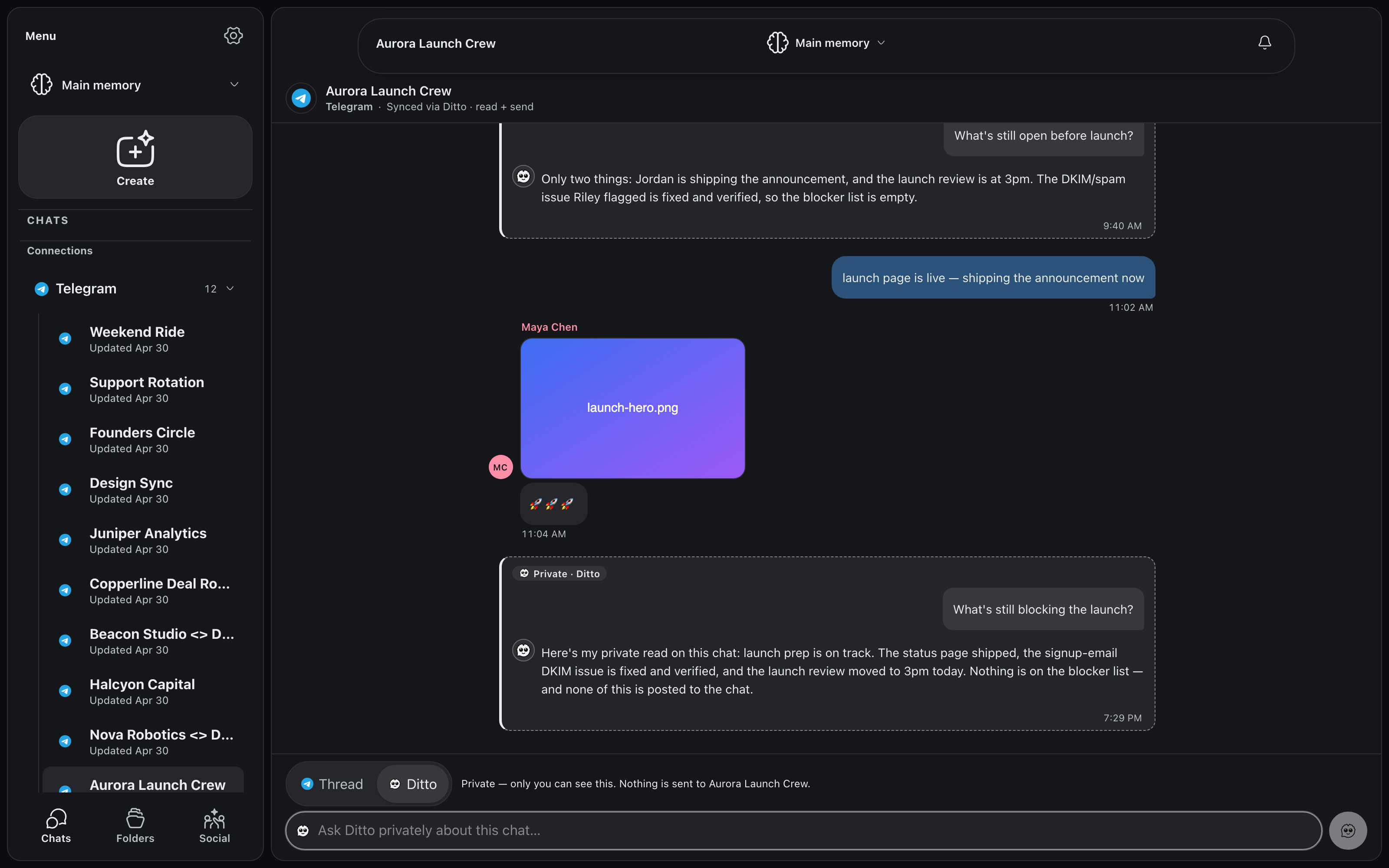
Nothing you say in Ditto mode is ever posted to the platform. The composer says so in plain text: “Private — only you can see this. Nothing is sent to Aurora Launch Crew.” The exchange renders inline in the conversation as a dashed “Private · Ditto” card, in place, right where you asked it, and you are the only one who can see it. Your groupmates see nothing, receive nothing, and have no indication you asked.
That turns every chat into something you can interrogate. Ask “what’s still blocking the launch?” from inside the Aurora Launch Crew thread, and Ditto reads the thread the way a caught-up teammate would: the DKIM issue Riley Novak flagged is fixed and verified, the review moved to 3pm, the blocker list is empty. Then it says so, to you alone.
Read-only threads get this by default. A connection you have not enabled sending on opens straight in Ditto mode, so the composer under a read-only chat is never a dead end; it is a private line to someone who has read the whole thing.
The part that matters: one memory underneath
A unified inbox is convenient. What makes multi-chat different is what sits under it.
Every mirrored conversation feeds the same persistent memory that powers the rest of Ditto. Your chats stop being silos and become one searchable, queryable record of what actually happened. And because Ditto’s agents work from that same memory, your conversations can drive real work.
Here is what that looks like in practice, in three workflows pulled straight from the screenshots above.
Workflow 1: cross-chat recall, without leaving the thread
The launch review time changed. Leo Park announced it in the Aurora Launch Crew group on Telegram: “launch review moved to 3pm tomorrow, calendar updated.” The next morning, Elena Sosa relays it into #launch-week on Slack, secondhand: “decided in the Aurora Launch Crew group on Telegram.”
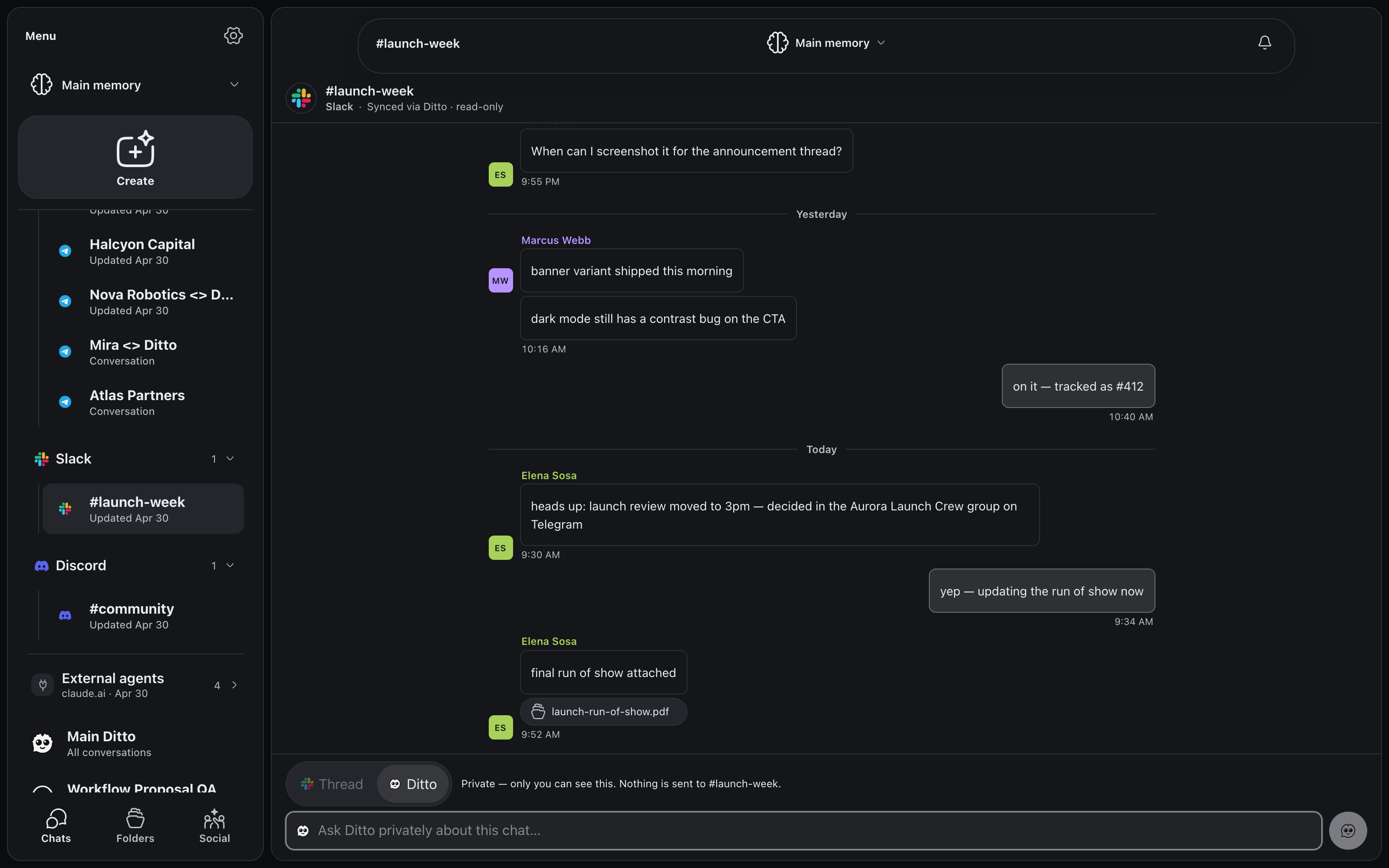
Before multi-chat, “when did we settle the review time?” meant scrolling two apps and trusting the relay. Now you type “@Ditto when did we settle the review time?” right there in the #launch-week composer. The composer flips to Ditto mode, the answer appears as a private card inside the thread, citing Leo’s original Telegram message as the source, and nobody in the channel sees the question. Memory is cross-chat, so it does not matter that the decision happened one app over.
Workflow 2: triage without app-switching
In that same #launch-week screenshot, Marcus Webb reports a bug: “dark mode still has a contrast bug on the CTA.” You are in Ditto, not in Slack. With sending enabled, you read it there and reply there (“on it, tracked as #412”), and the message posts to Slack as you; Marcus sees a normal Slack reply from a teammate. And when a thread is read-only, like this one is now, the composer opens in Ditto mode instead, so you can still triage privately: ask Ditto what shipped, what broke, and what Elena’s launch-run-of-show.pdf covers. Either way, the bug, the reply, and the ticket number are all in memory, linked to the launch.
Workflow 3: agents that act on what your chats decide
The home card in the first screenshot says “4 tasks are in progress.” That is the launch running itself out of your chats.
One of those tasks watches #community on Discord for beta questions and drafts answers from memory before you even open the channel: when starforge asks “is the beta waitlist still open?”, the draft is waiting for you, and it posts only when you approve it. Another picked up Leo’s Telegram message about the 3pm review and updated the launch checklist and the calendar hold to match. You did not forward anything. The information moved because the agents were watching the same memory your chats feed.
How to get it
Multi-chat is rolling out through Ditto V2 early access. Join the list, and we will open the door as connectors light up. Telegram, Slack, and Discord are first; more services follow.
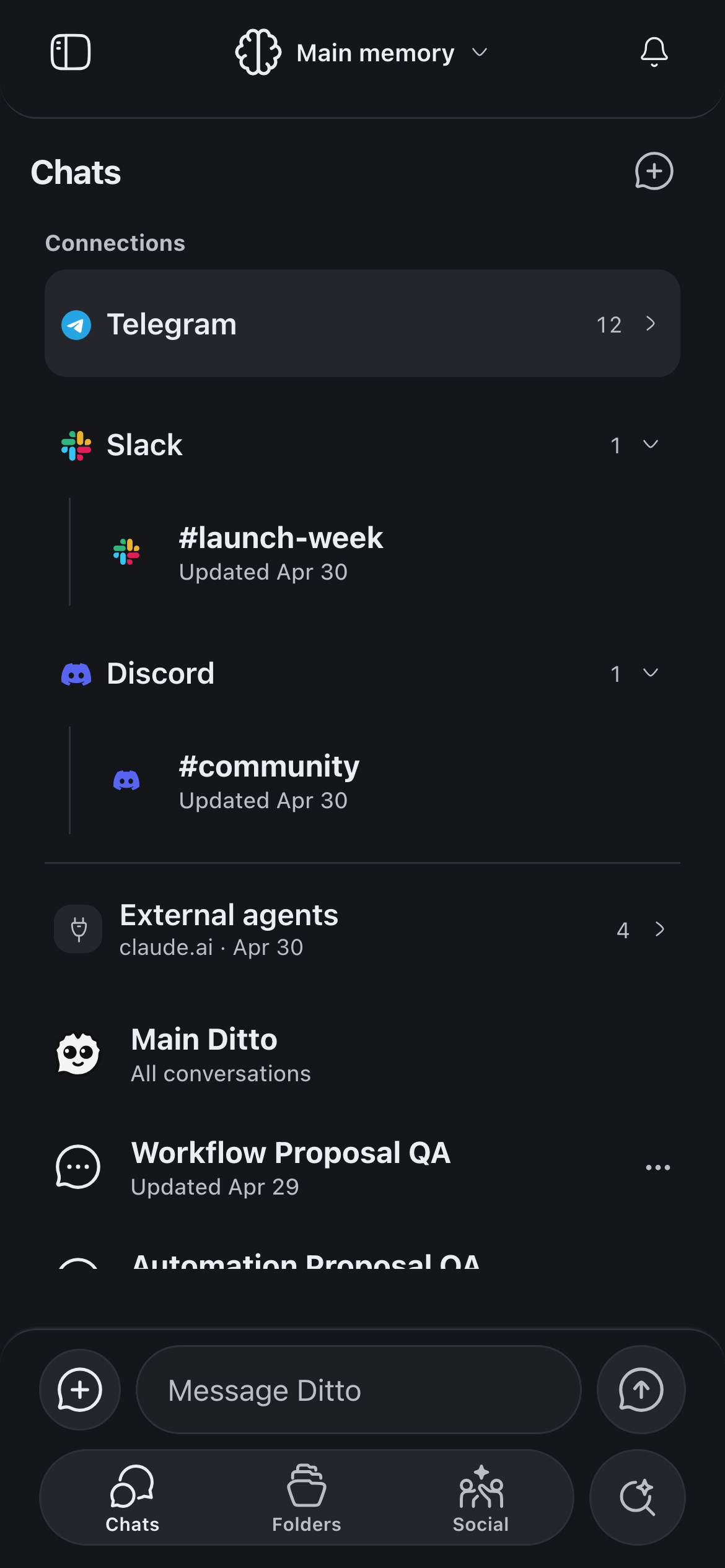
It comes to your phone too: the same inbox, the same sync, the same memory, wherever the ping finds you.
The pitch is the one we keep coming back to: your agents forget, your business can’t, and your business happens in your chats. Now Ditto is there too.