Status: in development. Everything below describes work behind a feature flag that is off for every account, including ours. It has unit tests and has been through two rounds of independent code review, with fixes after each. Nobody has used it on a live call yet. Nothing here is available in the app today.
Ditto’s voice mode is good at conversation. It has been less good at doing things. A voice session has carried its own copy of your tools, and that copy has drifted from the one your agent uses in text chat: some connectors never loaded in voice, and any action that needs your approval was simply removed, because a live call had no way to ask for it. Ask voice to email someone and the honest answer was often “I can’t do that from here.”
So we are changing the shape of voice mode. The voice model becomes a thin conversational layer on top of the agent you started the call with. It talks, it looks things up, and when you ask it to act, it hands the task to that agent and tells you how it went.
One agent, two ways to talk to it
Every voice session is already attached to a specific agent: the one whose chat you opened it from. Under the new design that agent is the only thing that acts.
When you say “email Bob that I’m running late”, voice calls a single tool, delegate_task, with your request in full. Ditto queues that request on the attached agent’s own chat thread, as you, in the same workspace, exactly as if you had typed it there. The agent’s ordinary chat turn picks it up and runs it with its own tools, connected apps, memory and tool permissions.
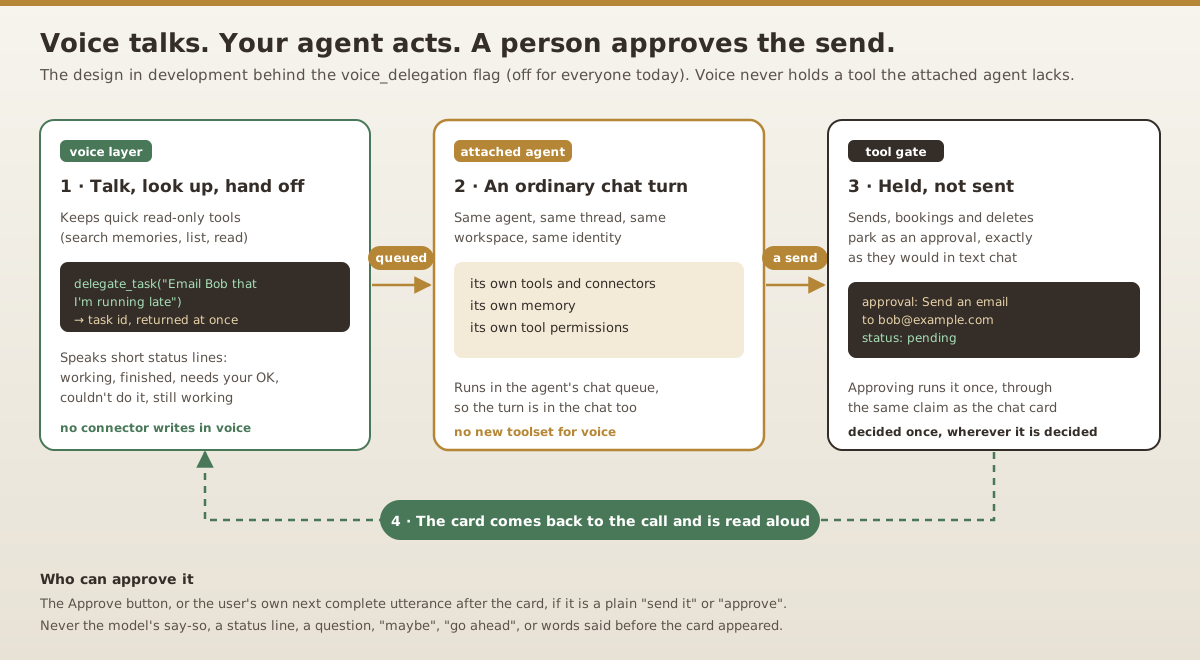
Three things follow from that:
- Voice never gains a tool the agent lacks. It cannot call the agent’s tools at all. It can only ask the agent, and the agent can only do what it could already do in text.
- The work shows up in the chat. The delegated turn is a normal turn in that agent’s thread, so you can read exactly what it did after the call.
- Voice keeps only quick, read-only tools. With delegation on, voice drops every connected-app tool that writes, sends or deletes, and keeps reads such as searching memories or listing messages, which answer faster in place than through a full agent turn.
The hand-off never blocks the call
delegate_task returns immediately with a task id. Voice says one short line (“I’ve asked your agent to do that”) and the conversation carries on while the agent works. A synchronous wait would leave you listening to silence for as long as the agent takes. Elsewhere in Ditto, a tool that waited on an agent’s reply timed out at two minutes even when the reply was on its way.
While the task runs, a watcher on the server follows the queued turn and reports each change twice: as a notification in the app that updates in place, and as a short status line the voice model relays in its own words.
| What the agent’s turn did | What you see | What voice says |
|---|---|---|
| Queued or running | ”Your agent is working on it” | A short “still working” or “busy, starting shortly” line every 45 seconds |
| Finished | ”Your agent finished” | A short summary of the agent’s answer |
| Parked a send | ”Needs your approval” | Reads the card and asks you to say “send” or “cancel” |
| Failed | ”Your agent couldn’t do it” | The reason, and that nothing was sent |
| Canceled | ”Task canceled” | That nothing more will happen |
| Still going after 10 minutes | ”Still working” | That the result will appear in the chat |
While the call is open, every way a task can end produces one of those reports, exactly once. A watcher that sees the same result twice, or a retry that races the first report, does not say it again.
Sends wait for you
Delegation does not loosen approvals. When the agent’s turn tries to send an email, post a message or book something, Ditto’s tool gate holds the call as a pending approval, the same way it does in text chat. The turn finishes without sending.
The watcher finds the approvals that turn parked, and only those: the gate stamps each held call with the id of the queued turn that made it, so an approval from another chat, another workspace or another task cannot appear in your call. It shows one card at a time, with the action, the recipients and the content on screen, and the voice model reads it aloud.
Approving goes through the same decision path as the approval card in chat and the console. Ditto claims a held call before it runs it, so whether you approve it by voice, by tapping, or later in the chat, it runs once.
When it runs, voice reports what happened. “Approved” is not “delivered”: if the provider rejects the message, voice says it was not delivered, and if delivery is not yet confirmed, it says so and asks you not to resend it. If your answer does not get recorded at all, the card comes back so you can answer again.
How Ditto checks a spoken “send”
You can approve a card by tapping Approve, or by saying so. The spoken path is the one that needs care, because the thing that hears you, the voice model, is also the thing proposing the action. So the server checks your words itself, against its own transcript, and the model’s word for it counts for nothing.
| Counts as approval | Does not count |
|---|---|
| ”Send it”, “yes, send it”, “send”, “please send it" | "Go ahead”, “do it”, “yes”, “confirm" |
| "Approve”, “approve it”, “I approve" | "Maybe send it”, “I haven’t approved this” |
| Said after the card was presented | Words from the request that started the task |
| Your latest complete utterance | Words still being transcribed |
| One card waiting | Two or more cards waiting at once |
The rules behind that table:
- Only your own words. The server keeps a numbered log of what you said and typed. The model’s speech and the status lines the server sends it never enter that log, so neither the model nor text it was given, such as an email body read out in a card, can approve anything.
- Only after the card. When a card is presented, the server notes the current point in that log. Anything said before it, including “send Bob a text” in the original request, cannot approve it.
- Only a finished utterance. Transcription can trail the audio, and “send it” may be the start of “send it to Alice instead”. The server waits up to two seconds for the utterance to finish and refuses rather than guess.
- Only a phrase that names the act. Generic consent answers whatever was asked last, which might be the model’s own unrelated question. Voice approval accepts only whole phrases that say “send” or “approve”.
- Only one card at a time. “Send” does not say which card, so with more than one waiting, voice refuses and the buttons decide.
- Each answer is used once. An attempt to approve uses up the words it judged, so a refused “wait” cannot later be glued onto a “send it”, and one “send” cannot approve two cards.
If transcription falls back to a less reliable mode during a call, the server refuses spoken approval for the words captured that way. The button always works.
Not starting things twice
Voice models retry tool calls, and a provider connection can drop and resume mid-call. Neither should queue the same task twice. The server identifies a task by the utterance you asked it in, which does not change while the model talks, finishes its turn or reconnects, so it answers a retry from the task already queued. A new request from you is a new task.
A call that still has a running task or an unanswered card does not detach for a later browser resume, because the watcher and cards live in that call. It ends cleanly instead. The task carries on in the agent’s chat, and any held approval is waiting on its card there.
What is left before anyone can use it
- Live testing. Unit tests cover the behavior above, and it went through two independent review rounds, each of which changed the design. None of it has run on a real call with a real connector yet. That happens on a preview build with a test account before the flag reaches any user.
- A latency budget. An action now costs a full agent turn, seconds to minutes, instead of a direct tool call. We need to agree on how long that may feel before turning it on.
- Connector coverage. Delegation makes a connector exactly as capable in voice as it is in text chat. It does not add capabilities a connector lacks. We are looking at some connectors’ booking and scheduling support separately.
- Small gaps. Delegated turns are not yet labeled as coming from voice in the chat, and a long call postpones its context refresh while a task or card is outstanding.
We will write again when this is something you can turn on. Until then, voice mode works as it does today, and everything in your agent’s chat works as it always has.