On 1 November, Ditto’s chat screen was hard to use in the Android app. Text jumped while a reply streamed. The text box jumped as the keyboard opened. After the keyboard closed, a gap of empty navy sat under the last message. Words you had just sent sometimes came back into the box.
Two days later we shipped a replacement. Ditto 3.22.0 has a rewritten chat screen: a new scroller, a new composer, a new way of drawing replies and new keyboard handling, with the old code deleted rather than patched.
The method mattered as much as the code. Every step produced something the next step could check:
- Record the bug on a real phone.
- Have a model that has never seen the code describe the recording.
- Map that description onto the code that draws each part of the screen.
- Draw how the screen should work instead.
- Try three foundations, measure them and keep one.
- Build the rewrite in stages.
- Capture it on the iOS simulator and a real Pixel, fix what the measurements show, and capture again until the shifts are gone.
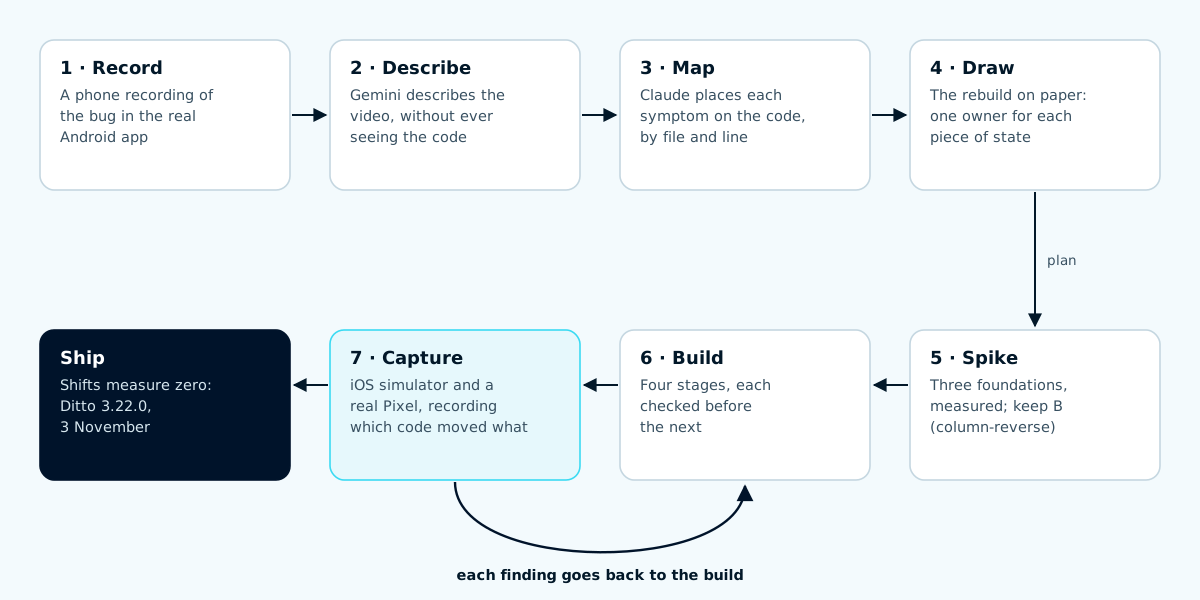
Steps 1 to 5 ran once. Steps 6 and 7 ran until every capture came back clean.
Step 1: Record what people see
Written bug reports lose the order of events: what jumped, and what you were doing when it did. Peyton recorded four minutes of the Android app with the system screen recorder while using it normally: typing with Gboard, sending, scrolling up into a reply, opening the model picker, closing the keyboard.
A recording keeps the timing that a written report loses. It shows that the gap appears after the keyboard closes, not before, and that Jump to latest pops up as the first paragraph of a reply streams in.
Step 2: Describe it without the code
We gave the recording to Gemini and asked for an exhaustive description. Gemini had not seen the codebase, on purpose. We wanted an account of the behaviour from someone who could only see the screen.
It came back with a timestamped play-by-play and five clusters of failure:
- floating elements that stayed on screen over sheets and menus;
- the keyboard moving the layout as it opened and closed, and leaving empty space behind;
- the composer flickering between Send, Queue and Undo, and sent text reappearing;
- streamed replies jumping, reflowing and briefly disappearing;
- sheets and banners stacking in the wrong order.
Gemini described what happened precisely. Its guesses about why were mostly wrong. Gemini described a native Android app, with RecyclerView recycling and window-inset callbacks. Ditto’s Android app is a web app installed from Chrome, written in Solid, so none of those mechanisms exist in it.
Some of the “bugs” were not Ditto’s. The red Stop chip and the square control in the top corner belonged to Android’s screen recorder, and the floating thumbnail was Android’s screenshot preview. The plus, GIF and microphone bar belonged to Gboard. A model watching pixels cannot tell which program drew them.
The description is a careful look at the frames. It can say what moved and when; deciding who moved it takes the code.
Step 3: Map the description onto the code
Next, Claude read the chat screen’s code and drew a map of it, with each symptom from the description placed on the part of the code that could produce it. Every claim pointed to a file and line, and Claude marked anything it had inferred rather than read.
The map sorted the screen into four layers that paint on top of each other: Android system UI, Gboard, Chrome, and Ditto. That settled the questions in step 2 quickly. Then it found four things in Ditto’s own layer:
- Nobody owned the scroll position. Sixteen code paths set the chat’s scroll position, each on its own timer, and two “reset guards” restored positions they had recorded earlier. A guard could undo a correct move a few frames later.
- The app sized the space under a new reply once. When you sent a message, the app reserved empty space under it equal to the height of the chat at that moment, with the keyboard up. Nothing measured it again when the keyboard closed. That was the empty navy gap.
- Jump to latest lived inside the composer. Showing it changed the composer’s height, which changed the distance to the bottom, which is the measurement that decided whether to show it.
- The composer had no state machine. Two functions read nine separate inputs to decide what the button and the panel above the text box should show, so they could land in combinations nobody designed.
In January we wrote about deleting 80% of our scroll code by letting the browser’s overflow-anchor hold the reading position. Ten months of edge cases had grown it back.
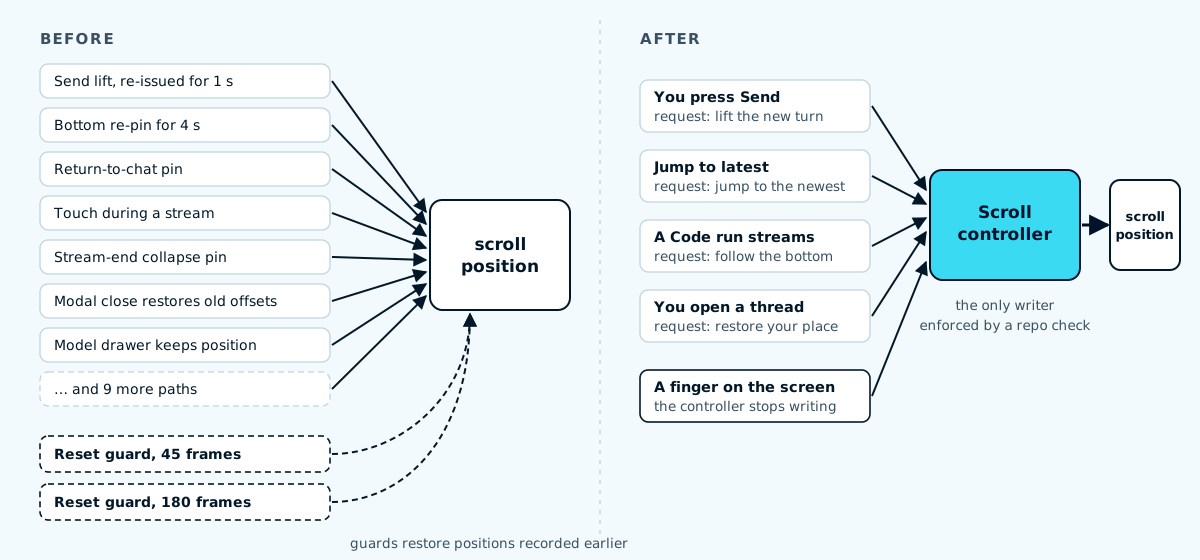
The old scroller had sixteen writers and two guards that undid them. The new one has one writer, and a repository check fails if any other code sets the scroll position.
Step 4: Draw the rebuild before writing it
The map described the current screen. The next drawing described the replacement, organised around ownership: each piece of state gets exactly one owner, the only code allowed to change it, and everything else asks that owner.
| State | Owner | What everything else does |
|---|---|---|
| Screen height and keyboard | Viewport model | Reads the height; never measures the keyboard |
| Scroll position | Scroll controller | Sends a request: send, jump, follow, restore |
| Turns and their phases | Transcript store | Renders one row per turn |
| Draft text and send state | Composer machines | Shows what the machine says |
| Menus, sheets and their order | Layer manager | Opens and closes; never touches scroll or layout |
Not every owner became its own module. The shipped code has the scroll controller, the composer machines and an iOS viewport model; Android needed only the viewport setting described in step 5. Turns stayed in the existing conversation store, now one keyed row per turn, and menus and sheets became overlays outside the composer instead of a separate manager.
Drawing it first made the hard decisions visible before any code existed. Jump to latest became a button floating over the messages, so showing it cannot change any measurement. A reply became one row from the moment you press Send to the end of the stream, so finishing a reply updates the row instead of replacing it.
One part writes; the rest hand it requests. The scroll position, the draft and the menus each have one owner in the new screen.
Step 5: Try three foundations, keep one
The main open question was how the chat scroller should keep the newest message in place while a reply streams in and the keyboard opens and closes. Instead of arguing it, we built three spikes, one per approach:
- A: a normal scroller that gives the last turn a minimum height equal to the chat area;
- B: a scroller drawn bottom-up (
column-reverse), so the browser itself keeps the newest message in place while the reply grows; - C: a virtualised list that only draws the rows on screen.
We scored each spike on the same scripted conversations in headless Chromium, with the CPU slowed 4×, and then on the Pixel with real Gboard.
| Measure | A | B | C |
|---|---|---|---|
| Leftover gap after a send, headless | 0 of 6 | 0 of 6 | 0 of 6 |
| Scroll writes from our code, headless run | 4 | 0 | 2 |
| Leftover gap, Pixel with Gboard | 0 of 10 | 0 of 10 | not run |
| Visible jumps caused by our code, Pixel | 12 | 2 | not run |
For comparison, the production app left a gap after 7 of 12 keyboard transitions on the Pixel, and its own code caused 17 visible jumps in a similar session. All three spikes fixed the empty space. B needed almost no help from our code, and Peyton found it the steadiest in the hand, so B became the foundation and the other two were not used.
C’s virtualised list kept only a handful of rows on the page at a time. That matters most on very long threads, which these scripted conversations were not. We are now measuring C against B on threads of up to 2,000 turns, and that comparison will be its own follow-up article.
The Pixel round also found a jitter none of the spikes caused. With Gboard open, Chrome panned the page and the app chased it with JavaScript about 19 times a second. One line in the page’s viewport settings, interactive-widget=resizes-content, tells Chrome to resize the page for the keyboard instead. The visual-viewport pan went from 88 px to 0 and the shell stopped moving.
Step 6: Build in stages
The rewrite landed in four stages, each checked before the next:
- Menus and sheets moved out of the composer, and the iOS viewport got one owner.
- The composer became two small state machines with an uncontrolled text box.
- Every turn became one row with a stable key and a phase.
- The app draws the row the moment you press Send, and the row keeps its identity until the reply is saved.
Stage 2 found the cause of “my text came back”. The app controlled the text box, so every change went through a binding that wrote the value back into it, and it cleared the draft at send while Gboard still held the last word as an open composition. Gboard could then put that word back. The new text box is uncontrolled, and the draft clears only after Gboard closes its composition.
Step 7: Capture, fix, capture again
We built a capture tool that attaches to the app on a phone or simulator and records every scroll write with the code that made it, every keyboard and viewport change, every change to the composer’s text and every row that mounts or unmounts, alongside a screen recording. Each round produced numbers, and each number either passed or sent us back to the code.
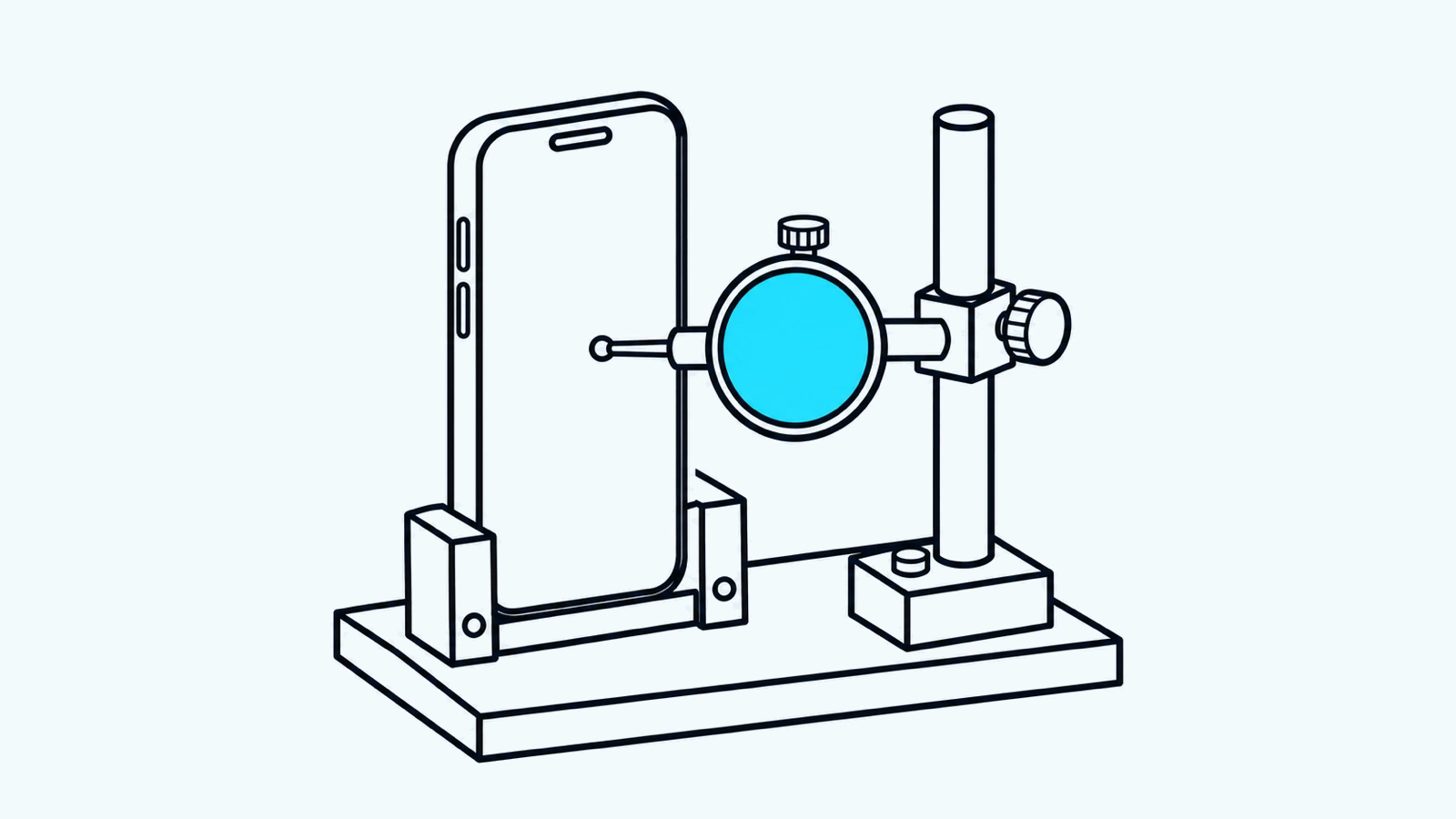
Each change went back on the bench. A finding counted when a capture measured it, and a fix counted when the next capture measured it gone.
What the iOS simulator found
The first Safari round on the iOS simulator found that with the keyboard up, a swipe over the messages panned the whole page by up to 402 points, pushing the header off screen. iOS ignores the Android viewport setting, so we added a small guard that cancels drags nothing can scroll while the keyboard is open. The pan went to 0.
It also found that Jump to latest needed two taps with the keyboard up. The first tap moved focus out of the text box, iOS closed the keyboard, the layout moved under the finger and Safari dropped the click. Keeping focus in the composer during the tap fixed it.
The third finding was a trade-off rather than a bug. Safari has no built-in scroll anchoring, so our code holds your reading place when a reply grows above it. Once the screen is still, it holds exactly. While a swipe is still coasting, it drifts: 296 px for 532 px of new text in one capture. We tried correcting it during the coast. Safari stops a fling dead the moment code writes the scroll position, so every flick through a streaming reply stopped. We reverted it, and a test now fails if the code ever writes the position from a scroll event.
What the Pixel found
The last round ran on a Pixel 8 Pro with Chrome and Gboard. Peyton typed an 882-character message, sent it, swiped up into the reply and tapped Jump to latest.
| Check | Production (Pixel) | Rewrite (Pixel, Gboard) | Rewrite (iOS simulator) |
|---|---|---|---|
| Scroll writes from our code | 17 to 32 per minute | 1, the jump | 7 in 110 s |
| Leftover gap after the keyboard moved | 7 of 12 transitions | 0 | 0 |
| Sent text coming back | reproduced | 0 of 639 text states | 0 |
| Page pan with the keyboard open | 88 px (old handling) | 0 | 0 |
| Jump to latest with the keyboard up | inside the composer | 1 tap | 1 tap |
| Reply rows remounting / idle frame at send | not measured / 2 of 6 | 0 / 0 | 0 / 0 |
Each rewrite column is one capture of one preview build, with its conditions recorded in the pull request. The production figures come from captures of the release that was live on 1 November, except the page pan, which we measured on spike B before the viewport fix, while it still used production’s keyboard handling.
What is still open
- Reading in Safari during a coasting swipe still drifts, as described above. The next step needs a real iPhone, because the trade-off is about how a swipe feels.
- The Pixel round did not cover reading inside a reply that is still streaming (Chrome handles that natively and our automated scroll tests cover it) or the model picker.
- One new bug turned up after release: tapping Jump to latest with the keyboard closed brought the keyboard back on Android, because Android keeps the text box focused after you dismiss Gboard. A fix is in review.
- The four-minute recording’s strangest moment, a flash of an older, unrelated reply, never reproduced in any capture, before or after the rewrite. The code path we suspected is still there, unchanged: without a reproduction we had nothing to test a fix against.
What we would reuse
A recording describes the problem better than a report. A model with no access to the code gives an honest account of what a person sees, and its wrong guesses about causes are cheap to throw away once the code is mapped. A drawing of the replacement makes ownership decisions before they become code. Spikes settle architecture questions with numbers instead of opinions. And a capture tool that records which code moved the screen turns “it feels janky” into a count that can reach zero.
The rewrite added 10,922 lines and deleted 8,249 across 106 files. The deleted code included the timers, guards and restore windows that existed to correct each other. If you use Ditto on a phone, the new chat screen is live now. Try it.