Coding agents can produce a working feature quickly. Two problems tend to remain afterwards.
First, the feature often looks bolted on. It works, but it arrives as a new flag, an if (newKind) branch beside code that already handles kinds, or a near-copy of an existing file. A reviewer can tell which part came last.
Second, UI review either does not happen or never ends. When nobody reviews, a change ships with text nobody can read on a phone. When an agent loops on “keep screenshotting until it looks right”, it can spend hundreds of screenshots polishing details nobody asked about.
We wrote a skill for our coding agents that addresses both: native-ui-review. It runs two passes after the code works and before the pull request opens. This post describes how it works and what happened the first time we ran it on real changes.
Status: the skill is in heyditto-stack#189. Our automated reviewer has approved it, but it is not merged, and five review comments on its helper scripts are still open. It is not yet the default workflow for our agents. Everything below comes from one example run, recorded in that pull request.
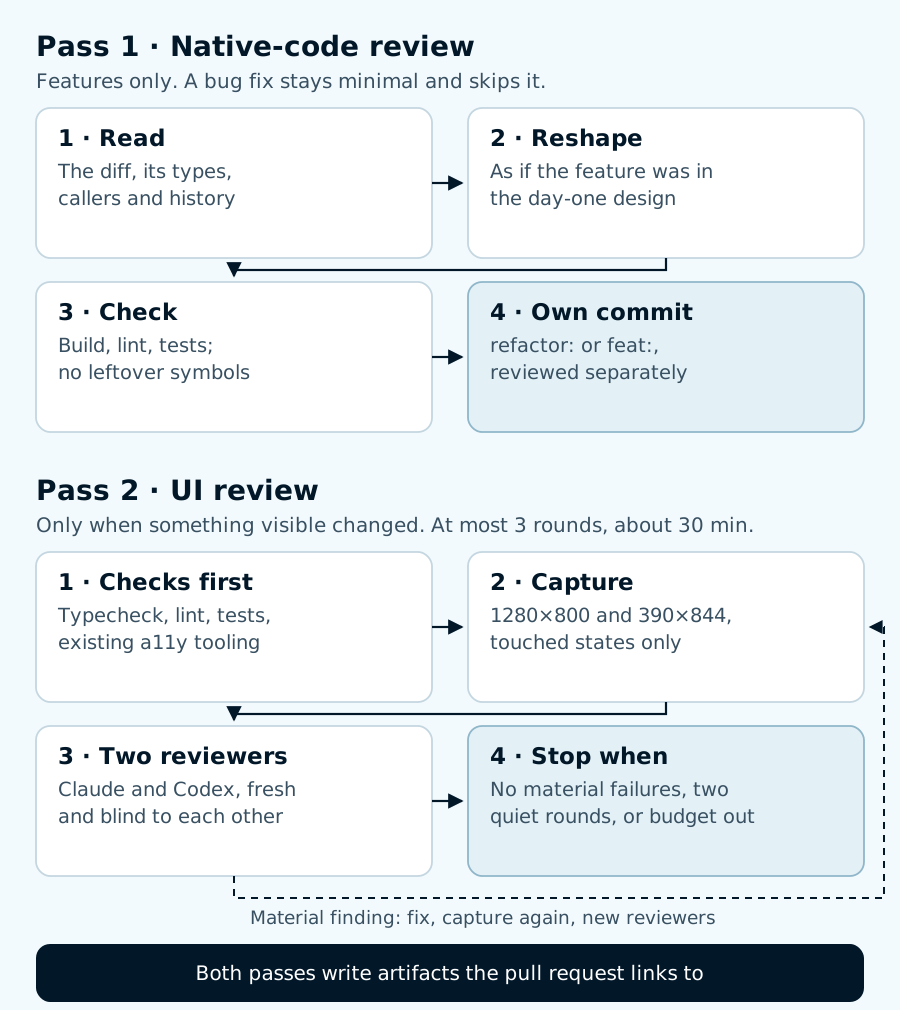
Each pass has a condition for skipping it entirely. Pass 2 also has a hard stop.
Pass 1: make the feature look native
Pass 1 adapts make-native, a skill Sloyd publishes under the MIT license. Its question is simple: if the original author had known about this feature on day one, what would the code look like? The agent reads the diff, then reads one or two levels deeper (types, callers and git log -p) until it can explain why the code has its current shape. Then it rewrites the touched code into that shape.
Upstream’s checklist names the smells to remove:
- aliases that re-derive a value something else already returns;
if (newKind)branches scattered through code that already dispatches on kind;- a new file that mirrors an existing one for a single variant;
- new flags that duplicate what a type already says;
- tests whose only job is to show that nothing else changed;
- a second logger, retry helper or config reader beside the existing one.
We kept upstream’s rules. The pass runs on features only. Reshaping a bug fix would bury the fix, so bug fixes stay minimal. It must not invent a new abstraction layer, and it must preserve behaviour. The reshape goes in its own refactor commit, so a reviewer can read it separately from the feature.
What it found
We ran Pass 1 on a recent feature in our agent workspace that added a second video renderer to our demo-video skill. It found two problems.
The first was in the documentation, and it is the same smell as an if (newKind) branch, written in prose. A file titled “Click indicators by video backend” held one recipe, which only worked for one backend. The recipe opened with “For Hyperframes, …” and a later paragraph began “For Raea, …”, repeating guidance that already lived in a dedicated per-backend section. The reshape labelled the recipe as that backend’s recipe and replaced the repeated paragraph with a link.
The second was a test that never ran. The feature’s tests sat beside the script they tested, but the workspace’s test command only looks in tests/. Before the reshape, that command ran 265 tests, and none of them were the four new ones. After the move, all four ran and passed.
Neither problem would show up in a demo. Both would have made the next change to that skill a little harder.
Pass 2: a UI review that knows when to stop
Pass 2 runs only when the diff changes something people see. A backend or docs change records “skipped: no UI” and moves on, as Pass 1’s example did.
Checks before opinions
Before any model looks at a screenshot, the repository’s own checks run: typecheck, lint, unit tests and any existing visual or accessibility tooling. A model is a poor substitute for a check that could have failed.
The capture script records two geometry signals for each screenshot: whether the page scrolls sideways, and which interactive elements are smaller than 24 pixels. Those numbers came first in every round below.
A small matrix
By default the agent captures two viewports, desktop at 1280 by 800 and mobile at 390 by 844. It captures only the states the change touches: empty, loading, error, disabled or success, as relevant. A wider matrix (tablet, dark mode, high-density screens) is for material UI work such as a new page or a navigation change, and the agent writes down why it widened.
Two reviewers who cannot see each other
The skill scores five things, each from 0 (material failure) to 2 (clean): consistency with the design system’s real tokens, visual hierarchy, responsiveness, accessibility and states. When both Claude and Codex are available, each reviews in a fresh context. Neither sees the other’s verdict or the author’s conclusions, and neither may edit files. With only one model available, the verdict says so and cannot be a plain pass.
In T3 Code, the agent that wrote the change runs both of these reviewers as separate, parallel tasks. Each round starts new reviewers instead of reusing earlier ones, so no reviewer defends what it said before.
Hard bounds
| Bound | Limit |
|---|---|
| Fix, capture again and review again | 3 rounds at most |
| Time for the whole UI pass | about 30 minutes |
| Screenshots, default matrix | about 20 |
| What happens to findings left when budget ends | reported as open, verdict needs-human-review |
The pass stops at the first of three conditions: no material failures remain, two rounds in a row find nothing new, or the budget runs out. A fourth round is not allowed even when one finding is easy to fix.
The first run
We pointed Pass 2 at a page our agents generate: a delivery-roadmap template, a single HTML file, that turns a backlog into an owner-by-owner calendar. It shipped in October. We captured three states (default, issue list open, and a search with no matches) at both viewports.
| Round | Material findings | Small targets left |
|---|---|---|
| 1 | 3: small targets, low-contrast text, phase type only by colour | 1 |
| 2 | 1: the table’s issue links, still 55 by 12 px | 0 |
| 3 | none | 0 |
In round 1 both reviewers flagged links and a print button under 24 px tall, and text in the accent colour at 4.16:1 contrast, below the 4.5:1 minimum. Claude also noticed that the calendar showed each phase’s type only by colour, with legend swatches close to invisible. The fix added a darker text token at 5.57:1, larger hit areas, the phase type in each bar’s accessible name and outlined swatches.
In round 2 both reviewers found the table links the first fix had missed. Claude also caught a regression from round 1: on mobile, the bigger header link sat 14 px below the page title. Round 3 found no material failures, so the pass stopped.
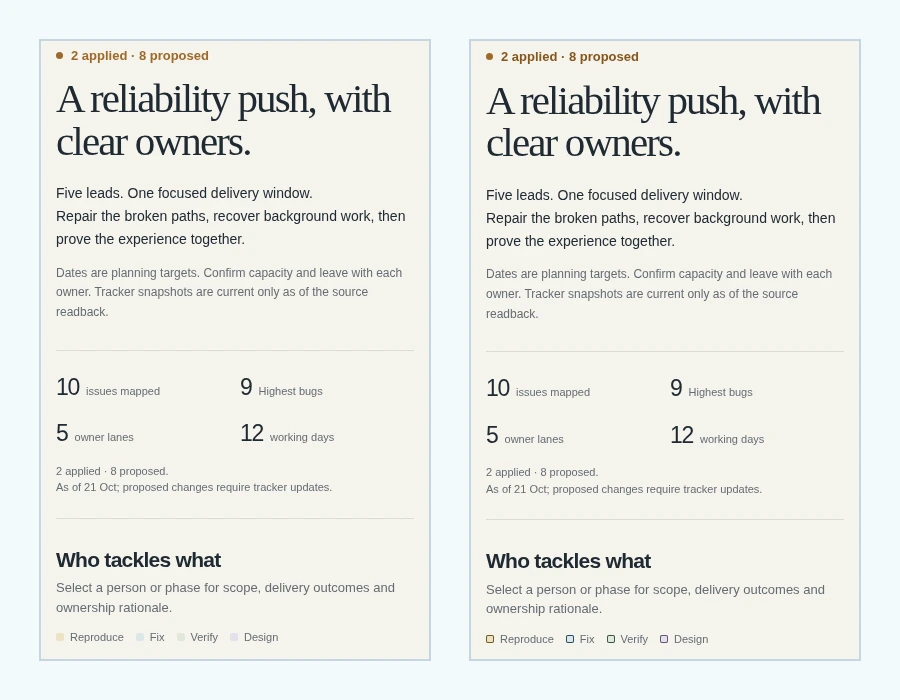
The template as shipped (left) and the result after three rounds (right), on a 390 px wide screen. The most important changes are invisible here: hit areas and the names a screen reader announces.
The verdict was pass with notes. Seven minor findings remain open for a person to decide, including a “Clear filters” button for the empty search state and a hint that the issue table scrolls sideways on phones. The round 3 fix caused one of the seven: on mobile, the larger table link pushes the issue key about 10 px below the first line of its row. Fixing it would have taken a fourth round, so the report lists it instead.
What it cost
| Measure | Value |
|---|---|
| Screenshots captured / kept as evidence | 30 / 12 |
| Rounds | 3 |
| Time from first capture to stop | about 12 minutes |
| Tokens | about 250,000, estimated (neither model reported usage for these runs) |
| Reviewers | Claude Opus 5.5 and GPT-6.1 Sol, a fresh pair each round |
What the pull request gets
Every run writes the same set of files: baseline and final screenshots, scores from each reviewer for each round, the native-review findings with the reshape commit, and a verdict of pass, pass-with-notes or needs-human-review. The pull request links them, so a human reviewer sees the evidence instead of a summary of it.
A small checker refuses artifacts that contradict themselves: a pass verdict with a material failure still open, more than three rounds, a screenshot count that does not match the files on disk, or one reviewer claiming to be two. Our automated review of #189 found five gaps in that checker and in the capture script, for example two reviewer entries where one names no harness. Those comments are still open, and we will fix them before merging.
Limits
- The evidence is one run on each pass. Two changes, both in an internal agent workspace, not in the Ditto app.
- The roadmap template was new when it shipped, so there was no earlier version to compare against. We used the shipped version as the “before”.
- Round 3’s screenshots overwrote round 2’s. The skill now requires a folder per round.
- The token figure is an estimate.
- The review checks what a model can see in two viewports. It does not replace the preview testing we do on real devices, and a pass verdict is not a merge approval.
Any coding agent can follow the skill: it describes capabilities (“a second reviewer from another model”, “a browser that can set the viewport”) rather than one vendor’s commands. Once #189 merges, we will run it on Ditto app changes and report what it finds there.