What if you could describe a web app in plain English and have it live on the internet five minutes later?
That’s Ditto Code. You type a message, an AI agent writes the code, installs the dependencies, runs the tests, and deploys it to a public URL. You watch every step in real time. You don’t need a terminal, Git commands, a deployment pipeline or any coding experience.
Ditto Code now ships with GitHub integration, two project types and real-time event streaming. The roadmap goes further: running an entire company from Ditto.
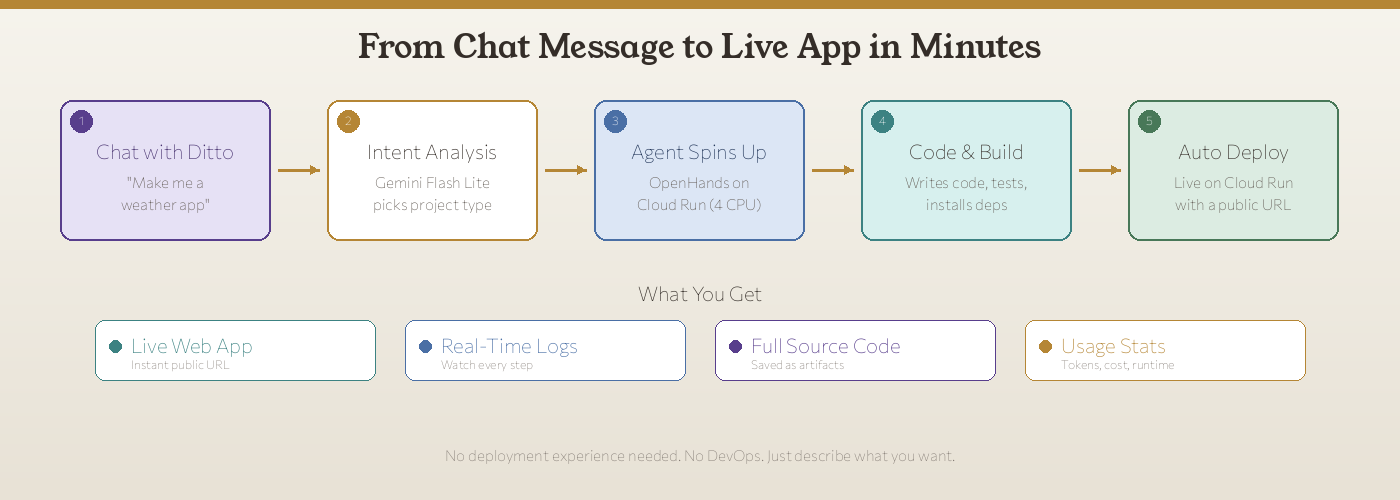
How It Works
The whole system fits into five steps, and you only do the first one.
1. You describe what you want
Open Ditto and type something like:
Build me a portfolio website with a dark theme,
project showcase section, and a contact form.
Or if you have GitHub connected:
Please refactor the auth module in @myorg/backend
to use JWT tokens instead of session cookies.
That message is all you contribute to the deployment.
2. Ditto understands your intent
A Gemini Flash Lite model analyzes your request and makes two decisions:
- Project type: Is this a new deployable app (
type=app) or work on an existing codebase (type=code)? - Project identity: Should this create a new project or continue an existing one?
If you mentioned a GitHub repo with @owner/repo, the system skips the classifier entirely and creates a deterministic code project.
3. An agent starts
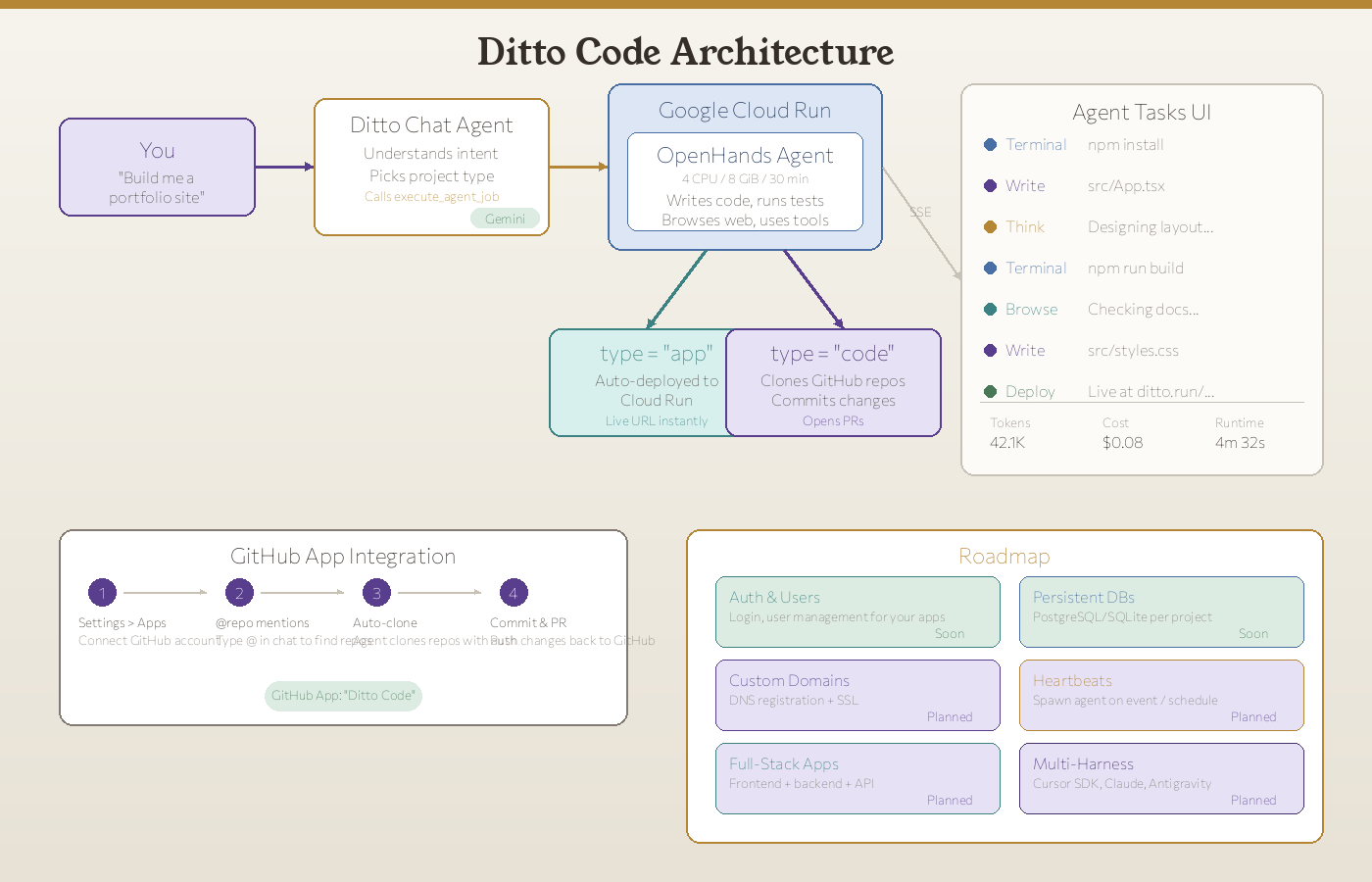
Ditto dispatches your task to a dedicated cloud environment: 4 CPUs, 8 GiB of memory, 30 minutes of runtime, running OpenHands, an open-source AI coding agent. The agent has access to:
- A full Linux environment with Node.js, Python, and common build tools
- Chromium for browsing documentation and testing
- Your Ditto memory via MCP (so it knows your preferences and past projects)
- Authenticated GitHub access (if connected) with
ghCLI for PRs and issues
4. You watch it work
Many “vibe coding” tools show you a spinner and then a result. Ditto Code’s Agent Tasks UI streams every action in real time:
- Terminal:
npm install,npm run build, test outputs - Write: Every file the agent creates or modifies
- Think: The agent’s reasoning about design decisions
- Browse: Documentation lookups and web research
- Deploy: The final deployment step with your live URL
You can see the agent’s token usage, cost, and runtime at a glance. If something goes wrong, stop the job and give it new instructions.
5. Your app goes live
For type=app projects, the agent’s output is automatically deployed to Google Cloud Run. You get a public URL within minutes. The source code is saved as Ditto artifacts, so you can change it, fork it or hand it to a developer later.
For type=code projects, the agent clones your repos, makes the changes, commits them, and can open pull requests directly on GitHub.
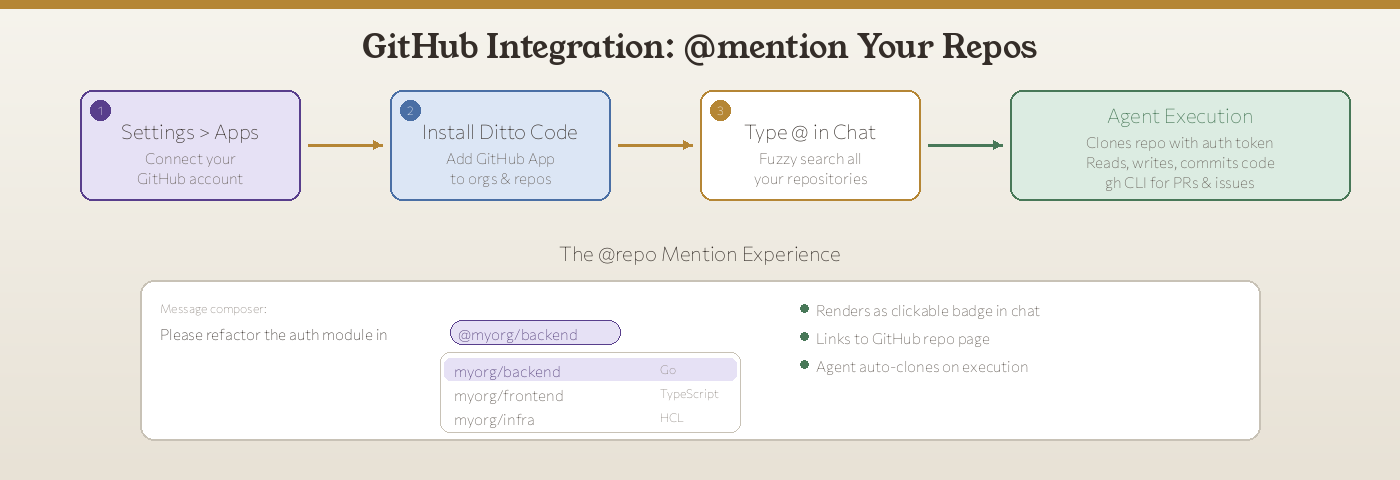
GitHub Integration: @mention Your Repos
The newest part of Ditto Code is GitHub integration through the Ditto Code GitHub App.
Connect in seconds
- Go to Settings > Apps in Ditto
- Click Connect GitHub (OAuth popup, same flow as Google)
- Install the Ditto Code GitHub App on your personal account or organization
- Done. Your repos are now accessible from the chat.
@mention any repo
Once connected, type @ in the message composer and a fuzzy-search popover appears with all your accessible repositories. Select one (or several) and they become part of your prompt. The @owner/repo mention renders as a clickable badge in the chat, linking directly to the GitHub page.
What happens behind the scenes
When you mention a repo and Ditto dispatches an agent job:
- The backend generates a short-lived installation access token using the GitHub App’s RSA private key
- The runner authenticates via
git config --global url."https://x-access-token:TOKEN@github.com/".insteadOf(tokens never appear in clone URLs) GH_TOKENandGITHUB_TOKENenvironment variables are set forghCLI access- The agent can read code, write code, commit changes, open PRs, and interact with issues
Permissions
The Ditto Code GitHub App requests only what it needs:
| Permission | Level | Why |
|---|---|---|
| Contents | Read & Write | Clone repos, push commits |
| Pull requests | Read & Write | Open and update PRs |
| Issues | Read & Write | Read context, create issues |
| Metadata | Read | List repos, branches |
| Commit statuses | Read | Check CI status |
| Emails | Read | Identify the GitHub account |
You can revoke access at any time from Settings > Apps.
Two Project Types
Ditto Code has two modes, and it picks the right one for you.
App Projects (type=app)
For when you want a deployable web application.
- Ditto scaffolds a Flask + HTML template
- The agent writes your app, installs dependencies, tests it
- On completion, the workspace is packaged into a Docker container and deployed to Cloud Run
- You get a live public URL immediately
- No DNS, no Dockerfile, no CI/CD pipeline to configure
Example prompts:
- “Build me a recipe organizer with search and categories”
- “Make a dashboard that shows real-time crypto prices”
- “Create a landing page for my consulting business”
Code Projects (type=code)
For when you want to work on existing repositories.
- Ditto clones your GitHub repos (depth=50 for speed)
- The agent reads the codebase, maps the structure and makes targeted changes
- Changes are committed with clear messages
- The agent can open PRs directly
- No deployment (the repo has its own CI/CD)
Example prompts:
- “Add rate limiting to the API endpoints in @myorg/backend”
- “Write unit tests for the auth module in @myorg/frontend”
- “Refactor the database queries to use connection pooling”
What This Means Today
Right now, someone with zero coding experience can:
- Open Ditto
- Describe a web app in plain English
- Watch an AI agent build it in real time
- Get a live URL they can share with anyone
The result is a production deployment on Google Cloud Run with a real URL.
We add to what “describe what you want” can produce every week. Today it covers single-page web apps and code changes. The goal is full businesses running on Ditto.
The Roadmap: Running a Company from Ditto
Everything below builds on Ditto Code as it works today. Here’s what’s coming:
Authentication & User Management
Your deployed apps will support user login out of the box. OAuth providers (Google, GitHub), email/password, magic links. Tell Ditto “add user authentication to my app” and it sets up the full auth flow, including protected routes and session management.
Persistent Databases
Every project gets its own database. PostgreSQL for relational data, SQLite for lightweight use cases. Your apps will persist data between sessions, handle migrations, and back up automatically. Say “add a database to store user profiles” and Ditto sets up the schema, ORM, and CRUD endpoints.
Heartbeats: Scheduled & Event-Driven Agents
Spawn an agent job on a schedule or in response to an event. “Check my API uptime every 5 minutes and alert me on Slack if it’s down.” “Every Monday morning, generate a summary report from last week’s data.” With Heartbeats, Ditto runs jobs when you are not at your desk.
Custom Domains with DNS Registration
Point your own domain at your Ditto-deployed app. We’ll handle DNS configuration, SSL certificates, and routing. Go from “build me a landing page” to “deploy it at mycoolstartup.com” in one conversation.
Full-Stack Applications
Frontend, backend, API, and database, all generated and deployed together. React or SolidJS frontends talking to Go or Python backends, with proper API contracts, error handling, and production configuration. One conversation, full stack.
Multi-Harness Execution
Today, Ditto Code runs on OpenHands. Soon, you’ll be able to choose your execution engine:
- Cursor Cloud SDK (Composer 2.5): Bring your own Cursor API key for cloud-based code generation with Cursor’s Composer 2.5 model, which Cursor reports at 79.8% on SWE-Bench Multilingual
- Claude Code: Anthropic’s coding agent for complex refactoring and architecture work
- Antigravity: A harness built for full-stack app generation
- OpenHands (default): The open-source agent Ditto Code runs on today
Each harness has different strengths. Ditto picks the best one for the job, or you choose.
The Bigger Picture
The tools to build software have been getting more accessible for decades. First we got higher-level languages. Then frameworks. Then no-code builders. Each step lowered the bar, but you still needed to understand the concepts underneath.
Ditto Code removes that requirement. You don’t need to know what a framework, a deployment or a database is. You describe the result you want. Ditto Code builds it in front of you, in real time, and you own the full source code.
Ditto Code gives people who don’t write code the same ability to ship software as developers. That includes the person with a business idea who can’t afford a dev team, the designer who wants to prototype without waiting for engineering, the researcher who needs a data dashboard but doesn’t want to learn React, and the founder who wants to test an idea the same day.
We ship improvements to Ditto Code every week. If you want to try it, open Ditto and describe what you want to build.
Questions or feedback? Reach us at support@heyditto.ai