Until now, everything Ditto did for you started with you. You open the app, you ask, it answers. But the things you most want from an assistant are the ones you’d rather stop thinking about: the Monday client digest, the daily scan of your industry’s news, the weekly check on whether that dependency finally shipped a fix.
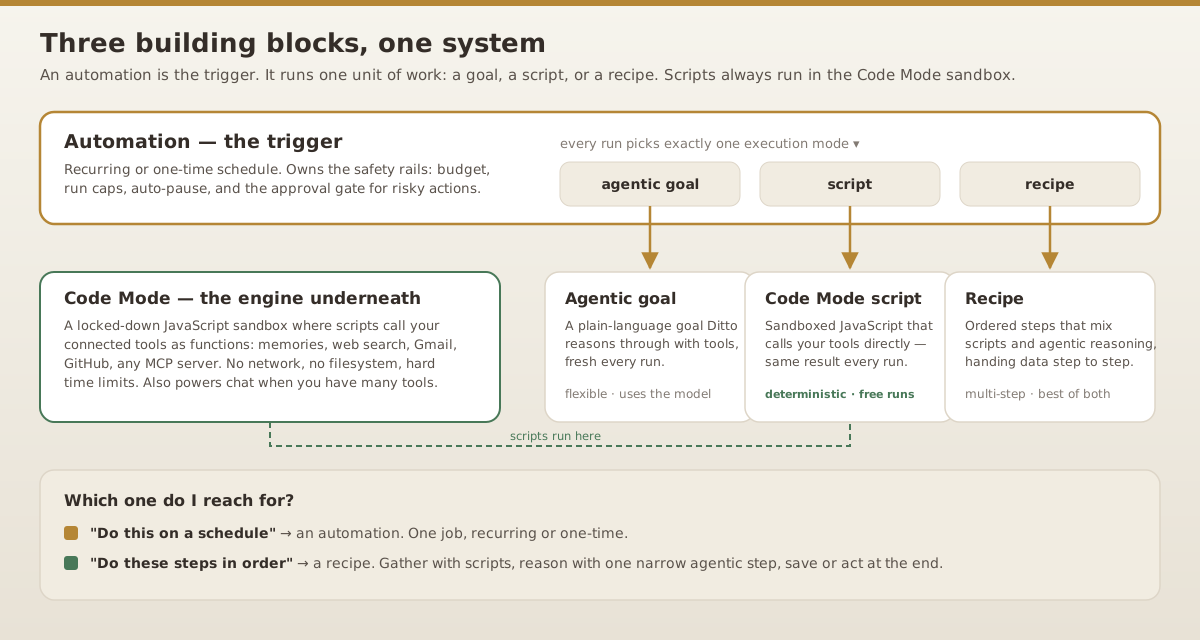
Three new capabilities change that. Automations put work on a schedule while you’re not in the room — each one runs either an agentic goal (Ditto reasoning with your tools) or a deterministic script, your choice per job. Recipes chain both kinds of steps, as many as the flow needs, into one repeatable pipeline. Code Mode isn’t a third surface to learn — it’s the engine that drives their scripts: a sandbox where small programs call your tools directly, instead of fumbling through them one call at a time.
None of it requires writing code or learning a workflow builder. You describe what you want in chat, Ditto drafts it, you click Apply.
Automations: tell Ditto once, it runs forever
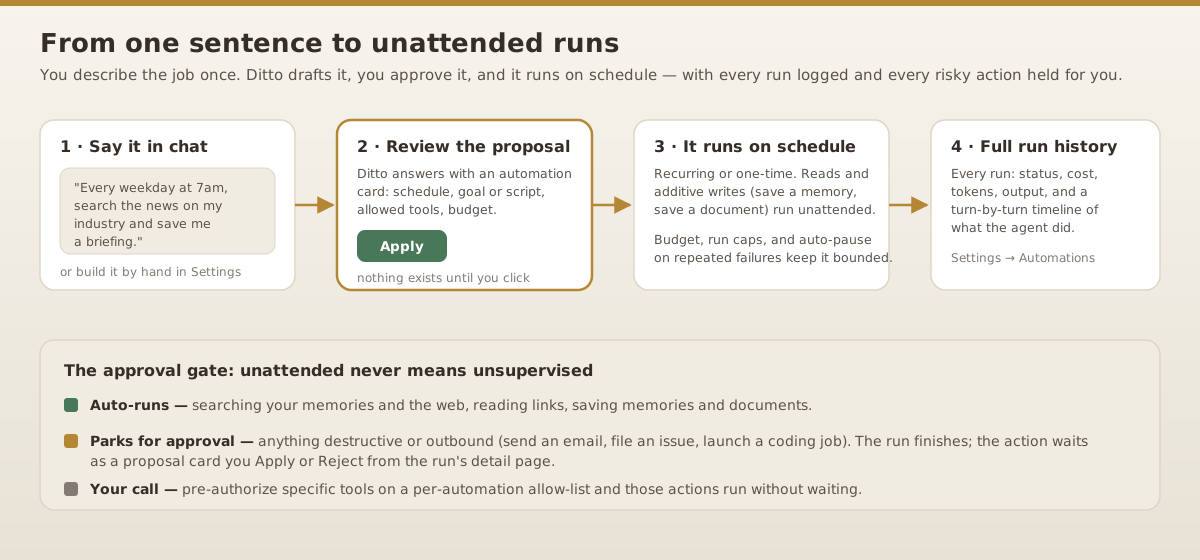
An automation is a job on a schedule — recurring or one-time — that runs unattended. Creating one takes a sentence:
Every weekday at 7am, search the news for anything about
the EU AI Act and small model providers, and save me a
short briefing with links.
Every Friday at 4pm, go through what I told you this week
and save a memory summarizing the decisions I made.On the first of each month, check my saved subscriptions
list against current prices and flag anything that went up.Ditto responds with an automation proposal card: the schedule, the job, which tools it may use, and its budget. Nothing exists until you click Apply. Prefer forms to prose? Settings → Automations builds the same thing by hand, with plain-English schedule pickers — “weekly on Monday at 9am” without any arcane syntax.
What an automation can do
One automation surface covers both agentic and scripted work — you pick per job:
- An agentic goal. A plain-language objective Ditto reasons through with tools, fresh each run — for tasks that need judgment (“read these results and decide what’s worth flagging”).
- A Code Mode script. Sandboxed JavaScript that calls your tools directly — for tasks that are mechanical. Scripts make zero model calls, so a scheduled script run is effectively free.
- A recipe. A saved multi-step flow (more below) that mixes both, when one job isn’t enough.
The available tools are the same ones Ditto uses in chat: your memories and knowledge graph, web search and link reading, saving memories and documents, launching Ditto Code jobs — plus everything you’ve connected, from Google Workspace to GitHub to any MCP server.
Scripts: generate them, or write them
Script mode has two doors. Describe the job in plain language and hit “Generate from a description” — Ditto compiles your words into a Code Mode script, validates it against your real tool catalog, and repairs it until it loads cleanly. Or write it yourself: the script editor in both Automations and Recipes has live validation, smart autocomplete, and ghost-text prediction that suggests the rest of your code as you type.
The economics matter either way. An agentic automation pays for model reasoning on every run. A script pays for intelligence once, at authoring time — every run afterward is deterministic, instant, and free. For a daily job that fires 365 times a year, that’s not a rounding error.
Unattended never means unsupervised
What stops a scheduled job with tool access from doing something you’d regret at 7am while you’re asleep?
A tiered tool gate. Reads and additive writes — searching your memories, browsing the web, saving a briefing — run freely. Anything destructive or outbound — sending an email, filing a GitHub issue, launching a coding job — doesn’t execute. The run completes, and the action parks as a proposal you Apply or Reject from the run’s detail page. If a particular action is fine to run unattended (“yes, always send the digest email”), add that tool to the automation’s auto-approve list and it stops asking.
On top of the gate, every automation carries hard limits you can see and edit: a per-run timeout, tool-call and turn caps, a lifetime spending budget, a maximum run count, and auto-pause after repeated failures. Every run leaves a full audit trail — status, cost, tokens, output, and a turn-by-turn timeline of what the agent read and did. It’s showing its work, applied to work you didn’t watch happen.
Recipes: multi-step flows you design once
Some jobs aren’t one action — they’re a pipeline. Gather context from three places, think about it, save the result, maybe act on it. Stuffing all of that into one agentic goal means paying the model to re-plan the whole pipeline every time, and hoping it takes the same path twice.
A recipe makes the pipeline explicit: an ordered list of steps, each either a script (deterministic, free) or an agentic goal (a model call, scoped to that step’s decision). Chain as few or as many as the flow needs — long alternating runs of scripts and agentic steps are exactly what recipes are for. Each step names its output, and later steps read earlier outputs as context.whatever — data threads through the flow, checkpointed at every step.
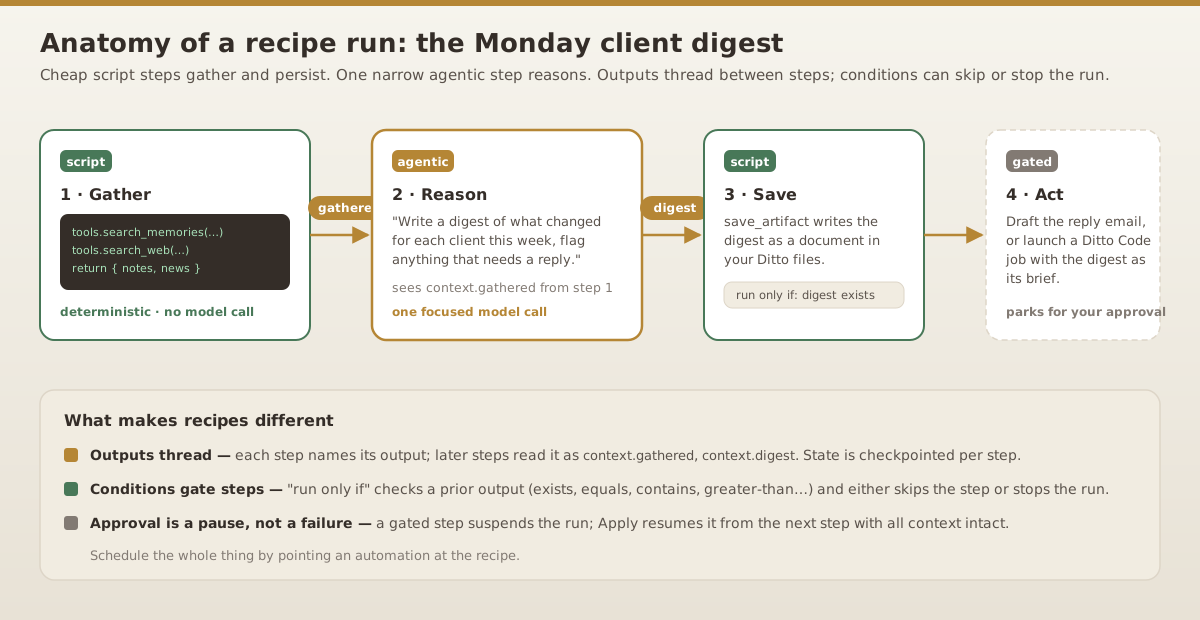
The cost-efficient shape for almost every recurring flow: scripts gather, one narrow agentic step reasons, scripts persist and act. The model gets involved exactly where judgment is needed — everything around it is free plumbing.
Real recipes, real mornings
The Monday client digest (the one in the diagram): a script pulls this week’s notes about your clients from memory and checks the web for news about their companies; an agentic step writes a per-client digest and flags anything needing a reply; a script saves it as a document in your Ditto files. Scheduled for Monday 8am, it’s waiting before your coffee is.
The competitor watch: a script searches the web for your competitors’ changelogs and pricing pages; a run-only-if condition stops the run gracefully if nothing came back — no paying an agentic step to summarize nothing; otherwise the agentic step compares findings against what you already know and saves only genuine changes.
The maintenance pipeline: a script gathers open issues and recent failures from your GitHub connection; an agentic step picks the highest-leverage fix and writes a precise, context-rich brief; a final step hands that brief to a Ditto Code job that edits the repo and opens a PR. That last step is gated — you get a proposed coding task with a well-researched prompt, not a surprise PR.
The release-week conveyor — a longer chain, for when the workflow is genuinely complex: a script pulls the week’s merged PRs from GitHub; an agentic step groups them into user-facing themes; a script fetches the linked issues for detail; a second agentic step drafts release notes in your voice; a script saves them to your files; a final gated step launches a Ditto Code job to open the docs PR. Six steps, two model calls — everything else is free plumbing, and every intermediate output is checkpointed and inspectable in the run’s timeline.
Control flow without a flowchart
Two mechanisms keep recipes robust without turning them into diagrams you have to maintain:
- Run-only-if conditions. Any step can check a prior output —
exists,equals,contains,greater-than, and friends — and either skip itself or stop the whole run. “Only save if the digest exists.” “Stop early if the search found nothing new.” - Approval as a pause, not a failure. When a gated action parks mid-recipe, the run suspends rather than dying. Approve it and the run resumes from the next step, all threaded context intact.
Building one
Same two doors as automations. In chat:
Design a recipe that every morning checks the weather,
pulls my calendar for the day, and saves me a one-paragraph
plan for how to schedule my deep work.
Ditto proposes a full recipe card — steps, scripts, threading — that you can edit inline before applying. Or open Settings → Recipes for the step builder, which ships with templates for the common shapes and a “generate a recipe from a description” panel that drafts the whole pipeline, scripts included and pre-validated. Run a recipe manually with one click, or schedule it with an automation whose job is simply “run this recipe.”
Code Mode: the engine your scripts run on
Code Mode is what actually drives the scripts — the same engine behind automation script mode and every recipe script step. The idea is borrowed from how good engineers work: instead of making one tool call at a time, write a small program. Whether a script was generated from a description or written by hand with the editor’s autocomplete, it executes in a locked-down sandbox where every connected tool is a callable function:
const issues = tools.github__list_issues({ repo: "acme/api", state: "open" });
const mine = issues.filter((i) => i.assignee === "me");
const events = tools.gcal__list_events({ date: "today" });
return { openIssues: mine.length, meetings: events.length };
One pass, several tools, real logic in between — loops, filters, math — with no model round trip per call. The sandbox has no network or filesystem access of its own and hard time limits; tools are the only thing scripts can touch, and your credentials never enter the sandbox.
Chat uses the same engine, for a different reason: scale. Normally every connected tool has to be described to the model up front, and every call is a full round trip — with Gmail, Calendar, Drive, GitHub, and a few MCP servers connected, that’s hundreds of tool descriptions burning context before you’ve said a word. In Code Mode, Ditto instead gets two meta-tools — search the tool catalog and run a script — and chains whatever it needs in one pass. It switches on automatically past ~40 connected tools, or turn it on under Settings → Apps → “Use Code Mode for tools.” Ditto also reaches for the sandbox for quick deterministic compute — ask for a mortgage payment or a date calculation and it runs the math instead of estimating it.
That determinism is what makes script steps safe to run unattended: same inputs, same code, same result, every time. Settings → Code Mode has the full reference, including a live searchable catalog of every tool from your connected apps; the same reference sits beside the script editors in Automations and Recipes.
Getting started
The fastest path is one sentence in chat:
Every morning at 8, check the weather in Austin and my
calendar, and save me a short plan for the day.
Review the card, click Apply, and check Settings → Automations tomorrow to see the first run’s full timeline. When you’re ready for pipelines, ask Ditto to design a recipe for your most repetitive weekly ritual — the one you keep doing by hand in five tabs.
You’ve spent months teaching Ditto your context — your memories, your projects, your people. Automations and recipes are how that investment starts compounding while you’re not even in the room.