Every AI assistant has chat threads now. ChatGPT, Claude, Gemini, they all let you start a new conversation and come back to it later.
So what? The feature shipped everywhere. Problem solved, right?
Not even close.
The Real Problem With AI Threads
Here’s what actually happens when you use threads in most AI assistants:
- You start a thread about a project
- You have a great conversation, make decisions, build momentum
- A few days pass. You come back to the thread
- The AI has technically retained the chat history, but it’s lost the plot. The context window has moved on. Your old decisions are buried under pages of text. The AI starts repeating itself or contradicting earlier conclusions
- You give up and start a new thread, re-explaining everything from scratch
AI threads everywhere else are just chat logs with a label. They store your messages, but they don’t understand them. There’s no structure, no persistence of the important stuff, no way to tell the AI “here’s what actually matters in this thread.”
This is why you end up with 47 dead threads in ChatGPT and keep starting fresh ones. The threads go stale.
Ditto Threads Are Different
Ditto Threads aren’t just conversation histories. They’re living workspaces where you attach the context that matters, and that context persists, evolves, and stays relevant no matter how long it’s been since your last message.
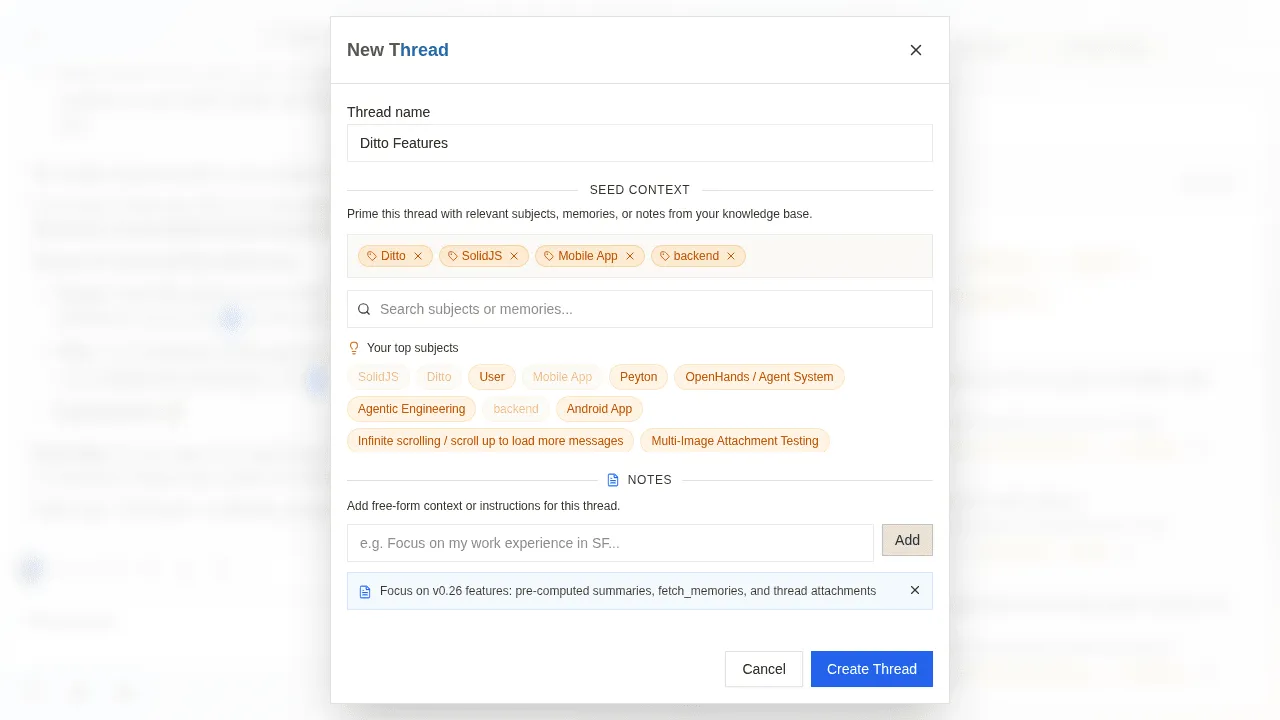
Every Ditto Thread lets you attach three things:
Subjects
Subjects are topics from your knowledge graph, things Ditto has learned about you over time. Attach “React,” “Job Search,” or “Home Renovation” to a thread, and Ditto has deep context about those areas of your life before you say a single word.
This isn’t a keyword tag. It’s a living reference to everything Ditto knows about that subject, extracted from every conversation you’ve ever had about it.
Memories
Memories are specific conversation moments that matter. Found a key decision from three weeks ago? An insight you don’t want lost? Attach it directly to the thread. The AI sees it every time you return, no scrolling, no re-explaining.
Notes
Notes are freeform context that doesn’t exist in any conversation yet. “The client budget is $50K max.” “Evaluate options by Friday.” “Don’t suggest Redux, we already decided against it.” Your AI reads these notes every time you chat in the thread.
Why This Changes Everything
The attachments are what make Ditto Threads fundamentally different from every other AI’s threading system. Here’s why:
Threads never go stale. When you come back to a thread after a week, or a month, the attached subjects, memories, and notes are still there. The AI picks up right where you left off, with full context. No re-explaining. No “remind me what we decided.”
Context is persistent, not just historical. In ChatGPT, your thread context is whatever the AI can fish out of the chat log. In Ditto, context is explicitly curated. You chose what matters. It stays.
Threads compound over time. The more you chat in a Ditto Thread, the more memories you can attach. The more subjects get enriched. Your threads get smarter the longer you use them, the opposite of going stale.
You can organize your whole life. Create a “Work” thread, a “Personal” thread, a “Side Project” thread. Each one carries its own context. Switch between them instantly, and the AI always knows exactly what you’re working on.
Real-World Examples
Here’s how we actually use Ditto Threads ourselves:
“Ditto Features” Thread
One thread dedicated to planning and discussing product features. Subjects like “Knowledge Graph,” “Memory System,” and “MCP Integration” are attached. Key product decisions from past conversations are pinned as memories. Notes track current priorities and deadlines.
Every time someone opens this thread, the AI knows the full product context, what’s shipped, what’s planned, what was decided and why. No catchup needed.
”Ditto Bugs” Thread
A thread for tracking and debugging issues. Subjects like “Backend,” “API,” and “Performance” are attached. Specific bug conversations are attached as memories so patterns are visible. Notes track known issues and workarounds.
Come back to this thread a month later? The AI still knows every open issue, every workaround, every decision. Try that with a ChatGPT thread.
Project Management
Create a thread per project. Attach the relevant subjects, key decision memories, and notes about constraints and deadlines. Every conversation in that thread is contextualized by everything the project needs, not just whatever the AI retrieves from its general memory.
Learning & Research
Studying a topic? Create a thread, attach the subjects you’re learning, pin breakthrough insights as memories, and add notes about what to focus on next. Your AI becomes a study partner that actually remembers what you’ve covered and what’s still ahead.
How Ditto Threads Compare
Every major AI assistant has added some form of memory and organization. Here’s an honest look at where things stand:
| Feature | ChatGPT | Claude | Gemini | Ditto |
|---|---|---|---|---|
| Named threads | Yes | Yes (Projects) | Yes (Gems) | Yes |
| Persistent chat history | Yes | Yes | Yes | Yes |
| Cross-session memory | Yes (global Memory) | Yes (global Memory) | Yes (global Memory) | Yes (per-thread + global) |
| Custom instructions per thread | No (global only) | Yes (Project instructions) | Yes (Gem instructions) | Yes (notes per thread) |
| File/doc uploads per thread | Yes | Yes (Project files) | Yes | Not yet |
| Attach knowledge graph subjects | No | No | No | Yes |
| Pin specific memories to a thread | No | No | No | Yes |
| Thread context backed by live graph | No | No | No | Yes |
| Thread context auto-updates over time | No | No | No | Yes |
ChatGPT, Claude, and Gemini all have memory features, credit where it’s due. ChatGPT’s Memory learns facts across all conversations. Claude Projects let you upload files and write custom instructions. Gemini Gems have custom instructions too.
So what’s actually different about Ditto?
The difference is structure. Other AI memories are flat, a list of facts (ChatGPT), a folder of documents (Claude), or a set of instructions (Gemini). Ditto’s memory is a knowledge graph. Subjects, people, topics, and memories are all interconnected.
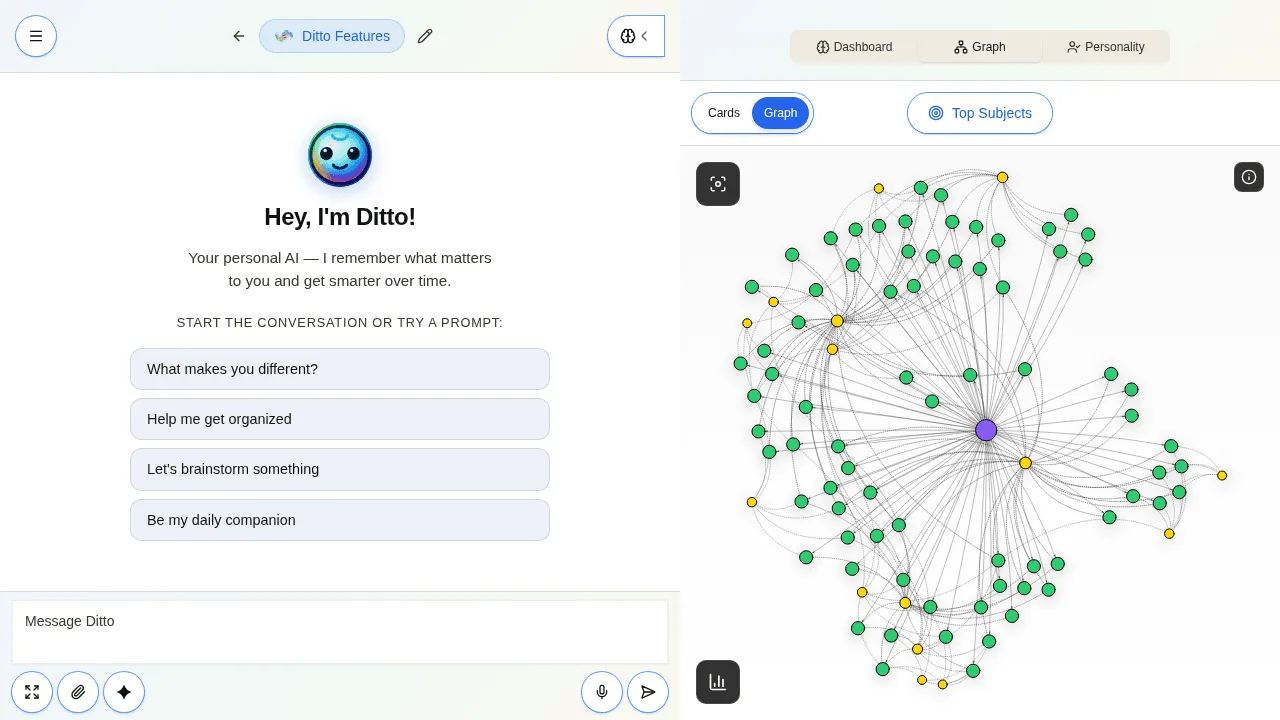
When you attach a subject to a Ditto Thread, you’re not pasting in a static note. You’re connecting a living node in your knowledge graph, one that gets richer every time you talk about it, across any thread. When your understanding of “React” evolves, every thread with “React” attached gets smarter automatically.
That’s the key difference: other AIs remember facts. Ditto understands relationships.
Getting Started
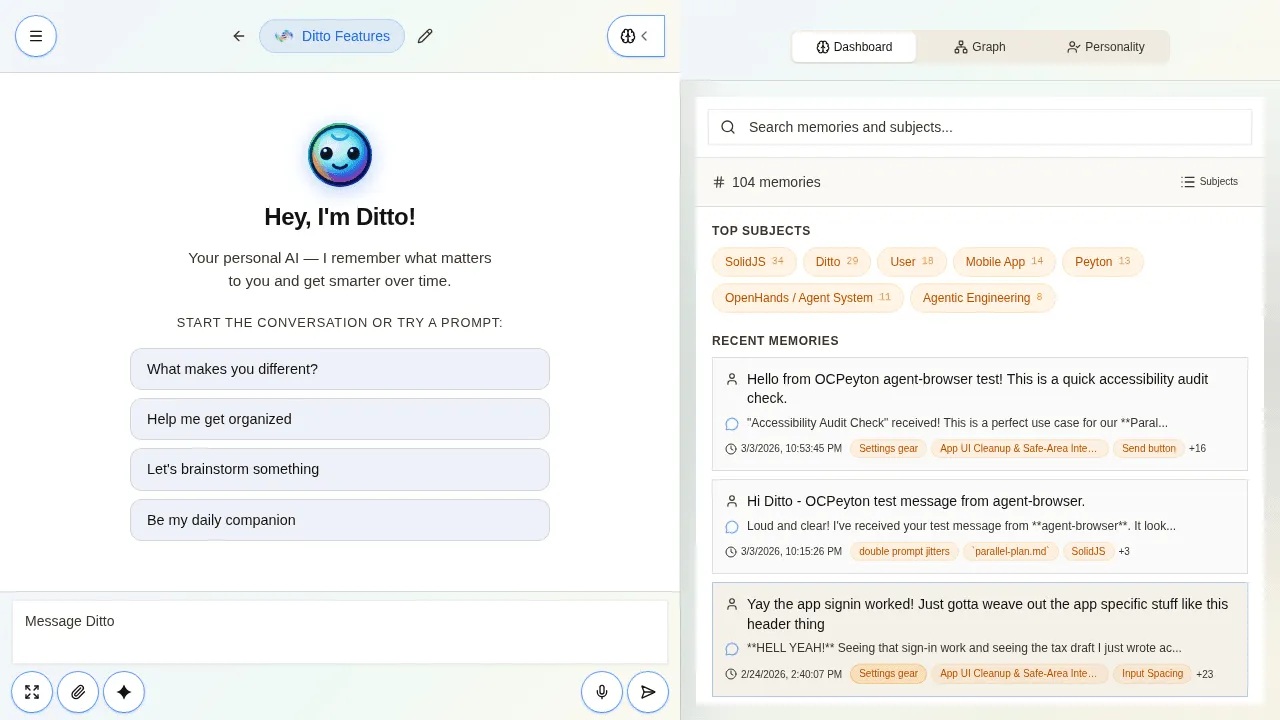
- Open Ditto
- Create a new thread and name it, “Work,” “Research,” whatever fits
- Attach subjects from your knowledge graph
- Pin memories from past conversations that should always be in context
- Add notes for anything the AI should know that isn’t in a conversation yet
- Start chatting, your AI is briefed and ready
The more you use Ditto, the richer your subjects and memories become, which makes every thread more powerful. It’s a flywheel that no other AI assistant has.
The Bottom Line
Every AI has threads. Every AI has some form of memory now. But only Ditto connects threads to a living knowledge graph that grows with every conversation.
Other AIs remember facts in a flat list. Ditto understands how your subjects, memories, and ideas relate to each other, and lets you wire that structured context directly into your threads.
Attach what matters, and come back anytime. Your threads stay rich, relevant, and ready.
Ready to try threads that never go stale? Start using Ditto free and create your first thread.
Ditto Threads are available to all users. Your knowledge graph and memories are built automatically from your conversations, the more you chat, the richer your thread context becomes.